
Build one patio campaign in order
- Choose Search and create an ad group for the patio work you take. Search ads can send someone to your patio page. You'll use a separate listing and lead setup for Local Services Ads, and you'll need to check whether your service and area qualify.
- Choose the towns you can serve. Review the location option and decide whether you want to prioritize people in or regularly in the area. Check where calls actually come from.
- Start with exact and phrase variations for paver patio installers and replacement work. Let the office flag nearby jobs you want to keep.
- Write an ad that matches the work and a page that shows a relevant project, town and next step.
- Test a call and form. A phone tap is a click. Check whether the person got through and whether it was one job inquiry.
- Review the search terms report after traffic begins. You'll see a selection of searches that triggered ads. Use the report alongside the office notes.
Before launch, set a dollar cap you can pay before any customer deposit comes in. For example, with $1,200 available and $300 set aside for setup, fees and office time, cap media at $900. For a new Search campaign, choose Campaign total budget if you've got a fixed $900 ceiling and a defined window, such as 30 days. Pause earlier if you've booked the available visits. If the first five answered inquiries are all for materials or jobs you don't take, pause and review the search terms and page.
For a crew covering Cary, use what the landing page actually offers.
Example Search ad for a patio replacement
Headlines:
Paver Patio Replacement
Paver Patios in Cary & Apex
Request a Patio Estimate
Replace Your Worn Patio

Descriptions:
Replacing a worn patio? Tell us your ZIP and what you need changed.
See a local patio project and ask whether your yard is a fit for a site visit.
Before launch, call the office directly and send a form from your phone. Check that someone picks up and the form reaches the office. If both are about the same property and project, give them one job ID. You'll check whether Google credited a call to the ads after the campaign starts.
If Local Services Ads are available for your job category and ZIP, try them for eligible requests you can answer quickly. They charge for valid leads, and Google may automatically credit some charges in the US. Search normally charges per click and lets you send a specific job search to its matching page. Run both if your crew has openings and they reach different jobs. Keep two budgets and log one opportunity when the same homeowner contacts you twice about the same work.
Two real U.S. landscaping Search ads
These are captures of the original U.S. Search creative previews from Google's advertising archive. Google can show different variations for the same advertiser. Read each example for the service and the next step a customer sees.
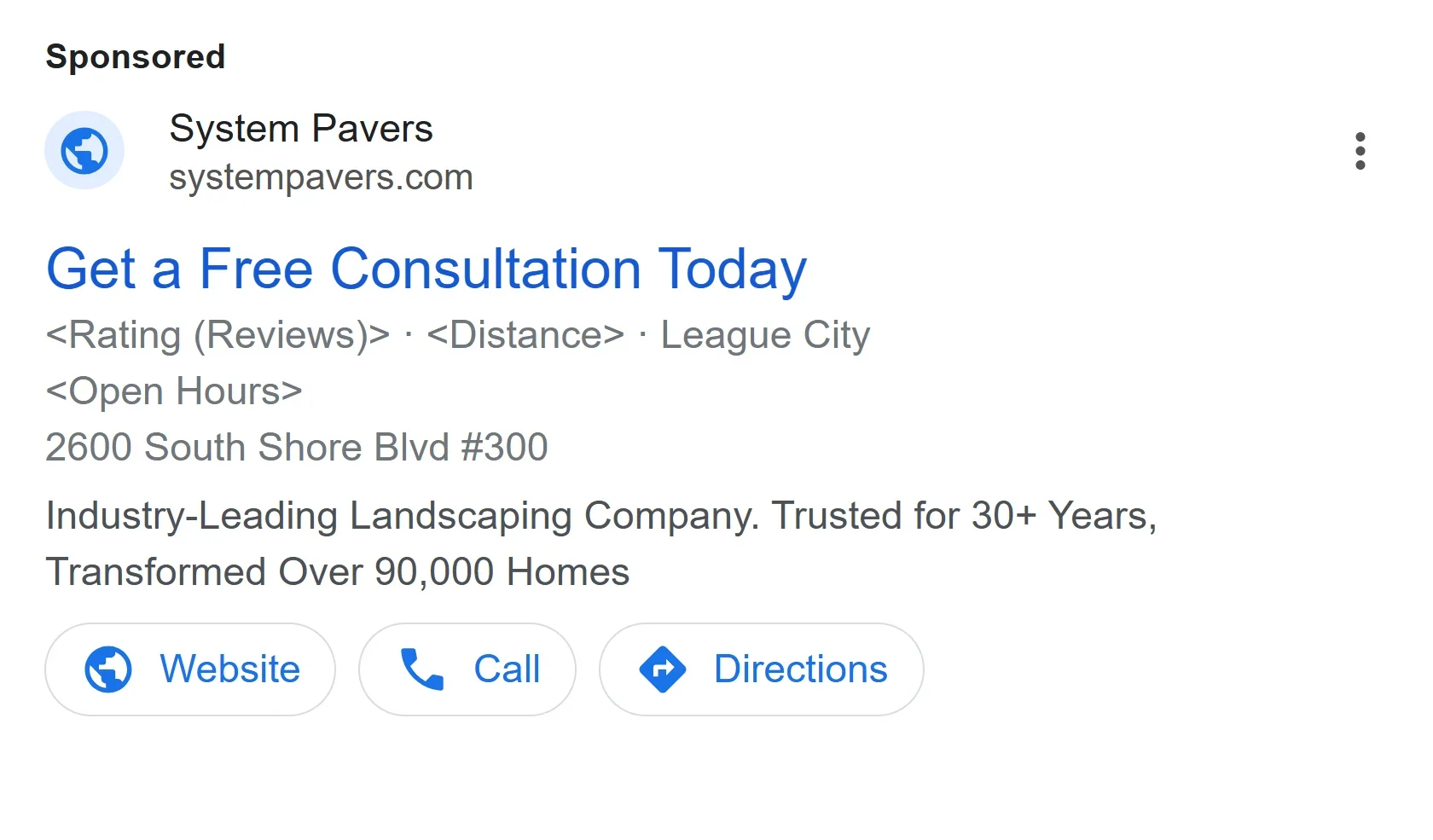
System Pavers in League City, Texas
This Google creative leads with a free consultation and gives the buyer website and phone options. If you'd like full patio replacements, test a headline that says exactly which patio work the consultation covers. Send people to the page that shows a similar job.
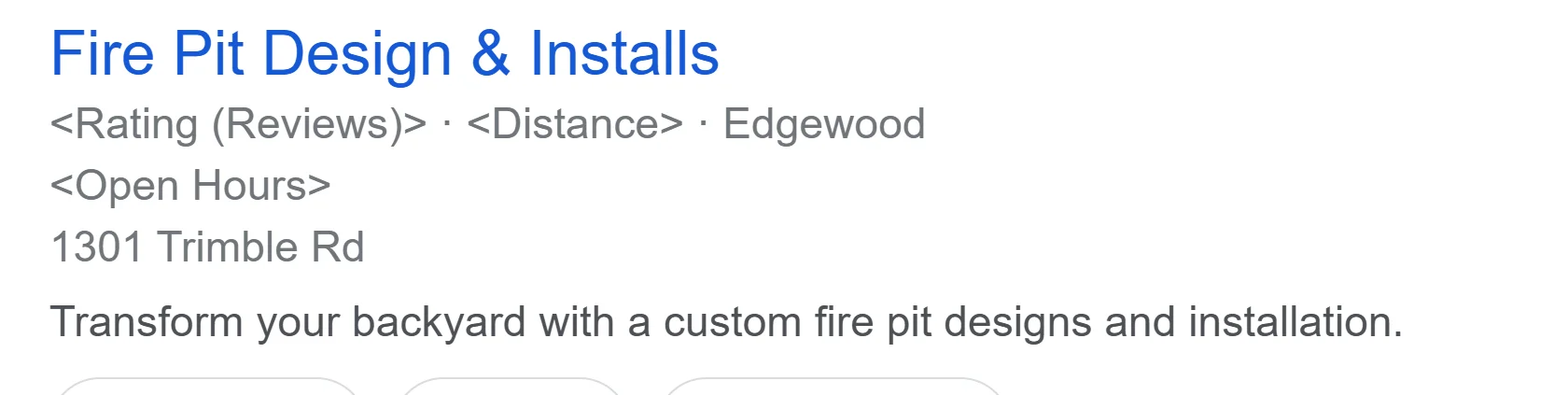
Custom fire pit installation in Edgewood, Maryland
This Google creative names fire pit design and installation in the headline. Its preview shows the Edgewood location. If your crew builds a patio and fire pit together, spell out both services and show a finished example on the estimate page.
Set up the patio campaign in your account
Say you're a paver crew serving Cary and Apex. You've got room for three estimate visits and want full replacements. Swap the towns and job type for your own. Check your estimator's calendar so you know how many visits you've got room for.
| Setting | What I'd start with | Check before launching |
|---|---|---|
| Campaign | One Search campaign with a patio replacement group. Add a new-install group when you can show a distinct offer and have room to test it. | Send replacement traffic to the matching page. New-install traffic can later go to its own page or a section that explains that job. |
| Goal and bidding | Start with Maximize clicks and an optional maximum CPC bid limit while you test your qualified-lead tracking. | Keep the campaign capped. Consider Maximize conversions once Google Ads consistently attributes distinct qualified leads. |
| Network | Start with Google Search while checking where early leads come from. Decide separately whether to test Search partners when you've got enough calls to compare. | Review the network settings rather than assuming the default matches the test. |
| Geography | Cary and Apex, or the closest supported targets with coverage you can actually serve | When you want local prospects, check the location options and choose the presence option where available. Confirm the job ZIP from the inquiry because platform location signals aren't perfect. |
| Budget | $900 Campaign total budget for a new Search campaign with start and end dates | Set the budget type during setup. With an average daily budget, most campaigns can be billed up to twice the daily average on a single day. Use Campaign total budget for the fixed test ceiling. |
| Lead actions | In the office log or CRM, link calls and forms to one record for the same homeowner and job. Mark it qualified once. | Use one supported import path per job and check its diagnostics. Keep overlapping raw actions as secondary and out of any custom bidding goal. |
| Schedule | Agree who takes calls and what happens after hours | Test the call asset and form outside staffed hours. Give the homeowner a clear expectation for when the office will reply. |
Start with the job words the office wants to hear. In a new-install group, test “[paver patio installation]” and “paver patio contractor.” In the replacement group, start with “[paver patio replacement]” and “replace paver patio.” Use exact match for the terms in brackets and phrase match for the other two. Google can still match relevant variants. Inspect the search terms report and the actual inquiries before scaling.
Make the ad and the next page match
| Ad element | Example for the replacement group |
|---|---|
| Service headline | Paver Patio Replacement |
| Local headline | Paver Patios in Cary & Apex |
| Action headline | Request a Patio Estimate |
| Descriptions | Use both lines in the example ad above. Each should make sense on its own when Google changes the headline and description combination. |
| Landing page | Show a replacement job, the towns you cover, what you replace and an estimate form that sends the request to the right office. |
| Phone action | Use a staffed number during the hours a homeowner can reach someone. Make the after-hours path clear on the page. |
Treat these as original ad examples to adapt. Only promise drainage, access work or a free estimate if your crew offers it. A homeowner searching for a replacement can land on a page with the old patio and the finished replacement, a photo of the base or drainage if it helps, and one action to ask about their yard.
Verify the form, phone and sales record
Ask your office to do a dry run. Send a valid form from your phone, then try one with a required field blank. The valid form should add one lead to the office record. The incomplete one should add none. Call your regular office number during staffed hours and try it after hours so you hear what a customer hears.
For calls from ads, find Call reporting under Admin Account settings. Once the ads run, compare the first eligible call placed through a Google forwarding number with your office log. In Google Ads, open Call details and check the time, duration and whether it connected. A direct call to your office number tests pickup. A call routed through Google's number tests ad attribution. Keep the office log either way and label test contacts so you can exclude them from your sales totals.
Before uploading customer data, agree to Google's applicable customer data terms, tell customers how you share their data for ad measurement, and get consent where the law requires it.
For a qualified web inquiry, have whoever manages your account and site set up enhanced conversions for leads. In Goals Conversions Summary, create an Import action and choose CRMs, files, or other data sources. Connect a supported CRM or export through Data Manager, choose Qualified lead, and map the event time and an identifier that can match back to the site lead, such as the email collected through your tagged form.
For a customer who only called from the ad, record the job in your office log. To attribute the qualified outcome to Google Ads, use a separate Calls via uploads action in a supported category. Match an eligible call through a Google forwarding number using the caller's number and the call start time. Keep ineligible calls in the office totals. If the same job came in by phone and by form, use a single import path.
Check the import diagnostics and the campaign's conversion reporting for each path you use. One attributed event confirms one match. Before changing bids, look for distinct qualified jobs over time and check the office log for a meaningful share of good calls missing from the imports. Stay with the capped click test if the signal is too sparse or misses a substantial source of good jobs. When the signal is dependable, select the tested campaign goals and use only the verified qualified actions for bidding. Keep overlapping raw calls and forms on Secondary for observation.
When you review leads, tag each submission as duplicate, wrong area, wrong job, qualified inquiry or unknown. Move qualified ones into scheduled, held, signed and completed as those events happen. Keep the original service, campaign and job ZIP in your lead record. If you import outcomes later, check which actions the bidding setup actually uses before treating a Google lead count as the number of jobs your office saw.
Decide what to do with the searches you see
Use a starter exact keyword like [paver patio installer] for a close match to the same intent, and a phrase keyword like "paver patio replacement" to allow searches that include that meaning. After seeing materials-only traffic, test a negative phrase such as "paver pallets". Review how negatives apply and keep replacement mentions your office can turn into jobs.
The keyword is what you enter. The search term is what the homeowner typed. Read both when calls are coming in for the wrong job.
| Search term example | First action | Why |
|---|---|---|
| Paver patio installer near me | Keep and check geography. | It describes the kind of buyer the page was built for. |
| Replace sinking paver patio | Check whether the caller wants full replacement or a repair. | Both are plausible until you know the job. |
| Paver pallets for sale | Add a relevant negative after verifying the scope. | Purchase of materials is a different task. |
| Weekly lawn mowing | Exclude if you only want installs. | It's outside the chosen campaign. |
Stay close to the initial job when the budget is small. When someone suggests loosening a match type, ask which good searches the campaign is missing and how the office will spot wasted calls.
Know when the numbers are good enough to expand
If $900 in media produces nine qualified inquiries and three signed jobs, that's $100 per qualified inquiry or $300 per signed job from media alone. If the setup, fees and office time used the $300 you set aside, your $1,200 total works out to about $133 per qualified inquiry and $400 per signed job. Keep pending estimates in the notes and keep signed and completed counts separate.
To set a break-even limit per qualified inquiry, multiply the share that becomes completed jobs by the amount left after direct project costs. Use a lower cap if you need to leave room for overhead and profit. If you're starting with an assumption, keep it labeled while quotes are open. Update the signed-job rate after those buyers decide and the completed-job rate after the jobs finish or cancel. Check both before you raise spend.
| What you see | What to change first |
|---|---|
| Most searches are for materials | Review terms and tighten negatives or match types. |
| The right searches lead to the wrong page | Repair the ad-to-page path and retest. |
| Good calls go unanswered | Set a staffed response window or fix lead routing. |
| Your next week fills with good estimates | Hold growth while you work through the jobs. |
Compare Search costs with job value
Change the example numbers to match your business. Dollar amounts are in USD.
Use the published number as a price check. LocaliQ reports a median of about $118 per landscaping search-ad lead in its U.S. 2025 benchmark. It covers Google and Microsoft Search campaigns across the trade. Compare it with your raw lead cost on that basis. Then use your own office records for the cost of a qualified patio inquiry, an estimate held and a job signed.
Split a cheap form from a job your estimator can bid
Before turning up a patio campaign, match a test phone call and form to the records the office works from. Write down which action the ad account counts and how your office keeps one homeowner from becoming two inquiries. The platform can count the action you configured even if the customer wants work you can't do.
| The office sees | Look here first | Change one thing |
|---|---|---|
| Calls for a loose paver or cleaning | The search-terms report and the service descriptions on the page. | Exclude explicit repair or cleaning searches you won't take. Keep terms that can still describe a full replacement. |
| People who say they live outside your service area | The caller's actual town, then the campaign's location settings and where you allow inquiries from. | Review whether the ad is reaching people only interested in that town. Ask for the project ZIP on the form and explain the towns you cover. |
| Good inquiries recorded twice | The call log and submission times for the same person and job. | Link both contacts to one job in the office log. Test that your integration sends one qualified event for that job. In Google Ads, check the import diagnostics and the goal selected for this campaign. Keep raw call and form actions out of bidding, including any custom goal. Stay on the capped click test until the action tracks distinct qualified leads consistently. |
| Good visits that turn into quotes when the ad report says zero | The original source and the office's estimate records. | Fix the handoff so you can match the stages. If your setup supports it, ask about feeding qualified leads back to Ads once the data and consent process are in place. |
Start with a single patio campaign and check these against a small set of real inquiries. That'll tell you more about what to change than a report with clicks and an average inquiry cost alone.
Diagnose a first week before spending more
| What you see | Look at this first | What I'd change |
|---|---|---|
| Spend with few searches for jobs you take | Search terms and match types. Compare installs, repairs and materials queries. | Add negatives for clear mismatches and separate replacement from repair. Keep a short list of terms that produced real calls. |
| Relevant searches with no tracked inquiries | Try the form and phone yourself. Open the mobile page from the ad destination. | Fix broken tracking or a dead quote path before changing bids. If they work, check whether the page offers what the searcher asked for. |
| Lots of form fills from outside the service area | Check job ZIPs beside the location settings. Look at whether the ad or page names the service area. | Tighten locations where appropriate and add the job ZIP question. Keep valid jobs that come from people researching on behalf of someone else if you can confirm the property is in range. |
| Qualified calls with few visits held | Check missed calls, time to reply and what the office says about availability. | Fix the handoff before buying more clicks. If the next three site visits are committed, stop selling those openings. |
| Visits held but quotes still open | Compare the same group of leads after the usual decision window. | Hold the budget steady while quotes mature. Check whether objections are about scope, price, access or schedule. |
If four calls want a truckload of pavers, you can fix a query mismatch without knowing close rates. If four good estimates are still open, you can't learn the cost of a signed job yet. Decide which problem you actually have before you touch the budget.
FAQ
How many services should I start with?
One priority service with a matching page and a person ready to answer. Add more after you understand what the first one brings.
Should I start with broad match?
Use a more controlled starting test when the budget and conversion data are limited. Decide what to expand after checking relevant searches and real calls.
How do I know a conversion is a real lead?
Test both ways of contacting you and check calls and forms with your office. Count one opportunity when somebody calls and submits a form for the same job.
How long should I test Search before I call it a bust?
Set an end date and all-in spending cap before launch. Check the calls and form early so you can fix bad traffic or broken tracking without waiting. At the end, separate dead inquiries, held visits and quotes the homeowner is still deciding on. Stop new spend at the cap. If you reach the cap with only scattered qualified leads, call the bidding test inconclusive. If you switched to conversion bidding, wait for the bidding system to adjust and for delayed conversions to appear before comparing its results. If the test ends before you can see that, keep the cap and leave the comparison open.
Review the same group after your normal quote window and record cost per signed job. Compare your all-in cost per qualified inquiry with the limit you set per qualified inquiry. Check the completed jobs and what they left after direct costs before you revise that limit or raise spend. Keep that sales decision separate from the bidding review.
Sources
- LocaliQ, 2025 Search Ad Benchmarks for Home Services. Verified November 23, 2026.
Before scaling a campaign, check the landscaping website examples for how to show a similar job and take an estimate request on a phone. The landscaping marketing budget guide will help set a ceiling based on completed jobs.
Next step
Our team can manage Search, the landing page and AI follow-up you choose. Start with one job and send the right calls to the office that can book it. 9xLocal packages start from $297/month. You pay the ad platform directly for media, with no markup. See what our Google Ads management for landscapers covers. See if we're a fit.