
Use the ten checks below to find the next job for your website. You don't need to copy another roofer's colors or buy a complete redesign to make the booking route clearer. If you'd like someone to handle it, see our roofing website design services.
The 10-point roofing website checklist
Give yourself one point only when you've checked the item on the live site. Don't tick a form because it looks good in a design file. Open it, enter a test inquiry on your own site and see whether your office receives it.
Open the website checklist in its own window. You can also use this table on paper:
| Check | What earns the point |
|---|---|
| 1. First screen | The service, area and booking route are clear before you scroll on a phone |
| 2. Call and text | Phone actions open the right number, and someone monitors the text route you offer |
| 3. Short form | It asks for name, phone, address and the problem, without demanding roof pitch or squares |
| 4. Review proof | A genuine review or review feed appears near the top with its source, rating and attribution |
| 5. Real photos | Visitors can see your actual team and work, with permission for identifiable people and properties |
| 6. Service pages | Every service you sell has a useful page that explains where you provide it |
| 7. Process | Visitors can follow the steps from inspection to final walkthrough and cleanup |
| 8. Specialty proof | Metal, tile or commercial work has relevant project evidence, if you sell that work |
| 9. Phone usability | Text is readable, pages load usefully and overlays don't block buttons or forms |
| 10. Next step | The thank-you page explains what happens next, and your team receives and follows up on the inquiry |
A score of 10 means you've checked these ten basics. It doesn't measure sales. If you score 9 but the missing point is a broken inquiry route, fix that before changing fonts. Treat an unclear booking route, missing proof and missing service pages as the three priority repairs.
Read your first screen to your spouse or someone outside roofing. If they can't tell what you'd do for their home, rewrite it. Replace a paragraph about how proud you are with a clear answer to their problem. You can still introduce the crew, but make the reason to call easy to understand.
For photos, gather a real finished roof, work in progress, your team, a branded truck and a happy customer who's happy to be pictured. Don't force all five into the first screen. Choose the evidence that fits the work you want more of.
Annotated examples
These four public homepages were captured on October 28, 2026. Each offers useful design choices and one idea I'd test in the captured view. We're looking at design and visible content; these images don't tell us the companies' traffic, booking rate or sales.
Retail work: make the area and next action obvious
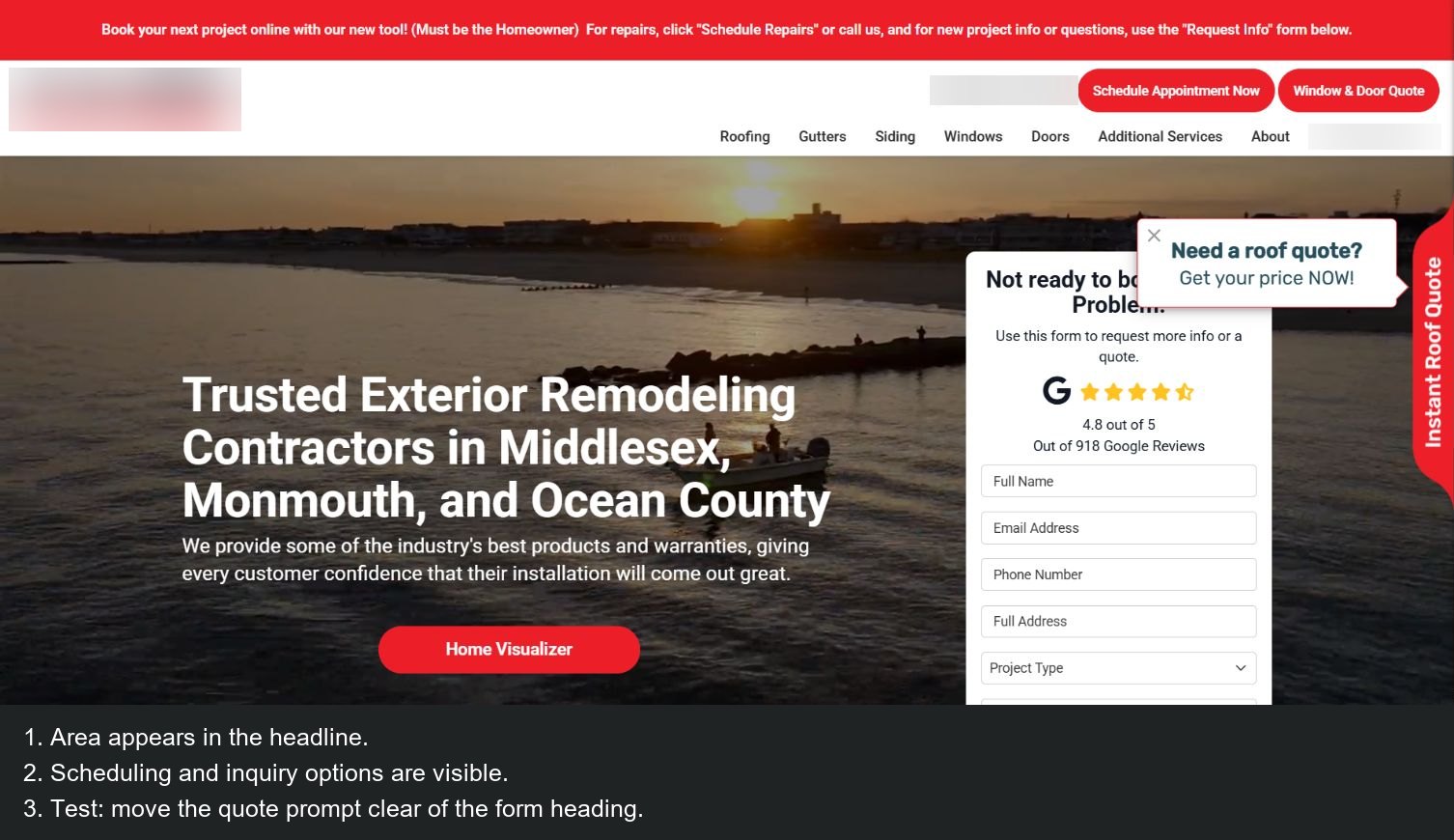
Source: contractor homepage, captured October 28, 2026.
Two useful choices: the headline names the counties served, and the top bar gives a scheduling option while the adjacent form lets someone request information. A homeowner doesn't have to guess whether they're in the right area or ready for the right type of request.
One thing I'd test: I'd test moving the quote prompt so it doesn't cover the form heading. That would let the form and quote option each have their own space. On your own site, try the same check on a phone with the keyboard open.
Metal roofing: put the service beside the quote route
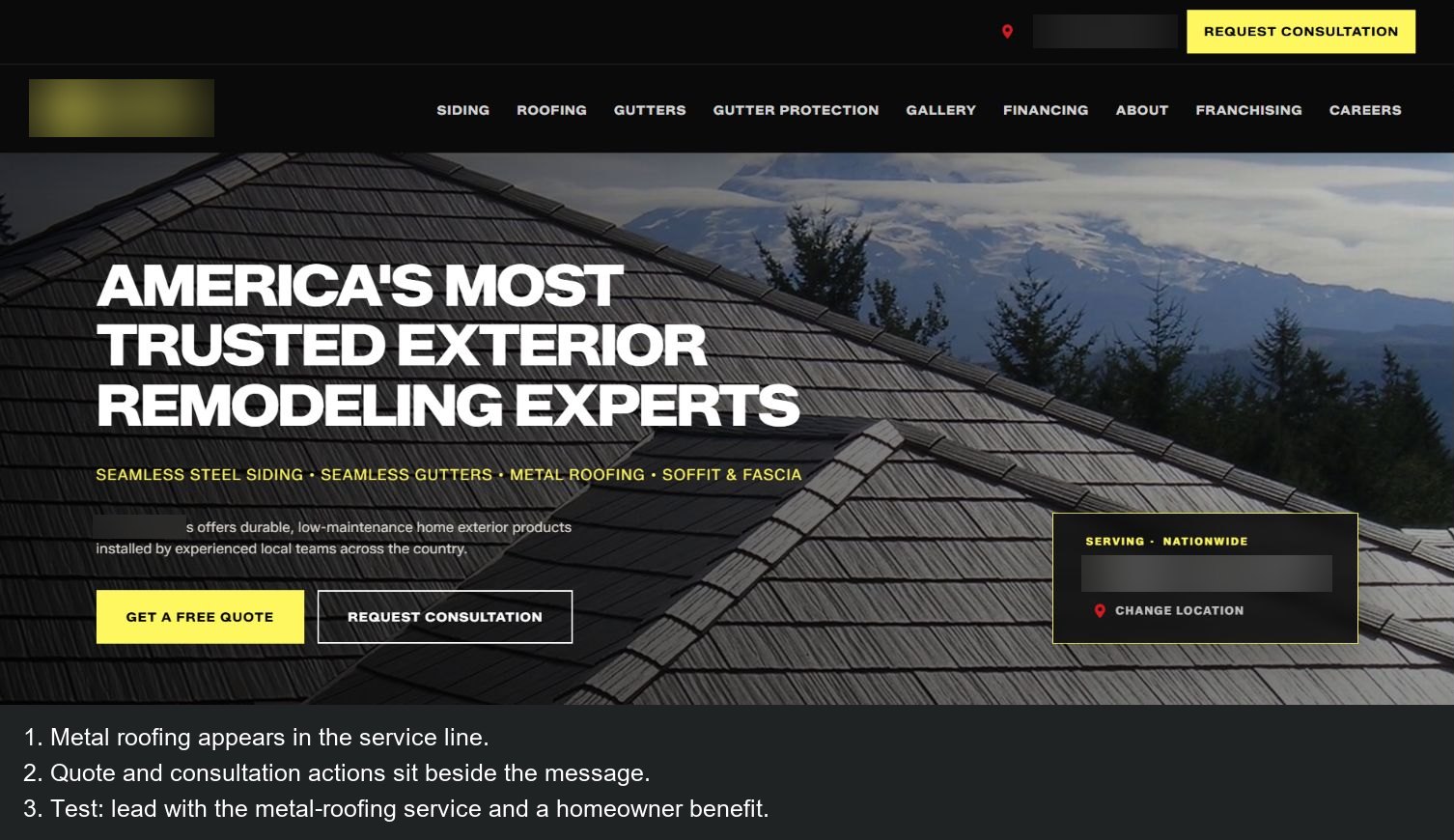
Source: contractor homepage, captured October 28, 2026.
Two useful choices: metal roofing is named in the service line, and quote and consultation buttons sit beside the message. The visitor can move from recognizing the service to asking about it without searching the menu.
One thing I'd test: I'd test leading with the metal-roofing service and a specific homeowner benefit, while keeping the trust message and supporting project evidence nearby. That could help a visitor recognize the service even sooner.
Commercial systems: show the buildings you want to work on
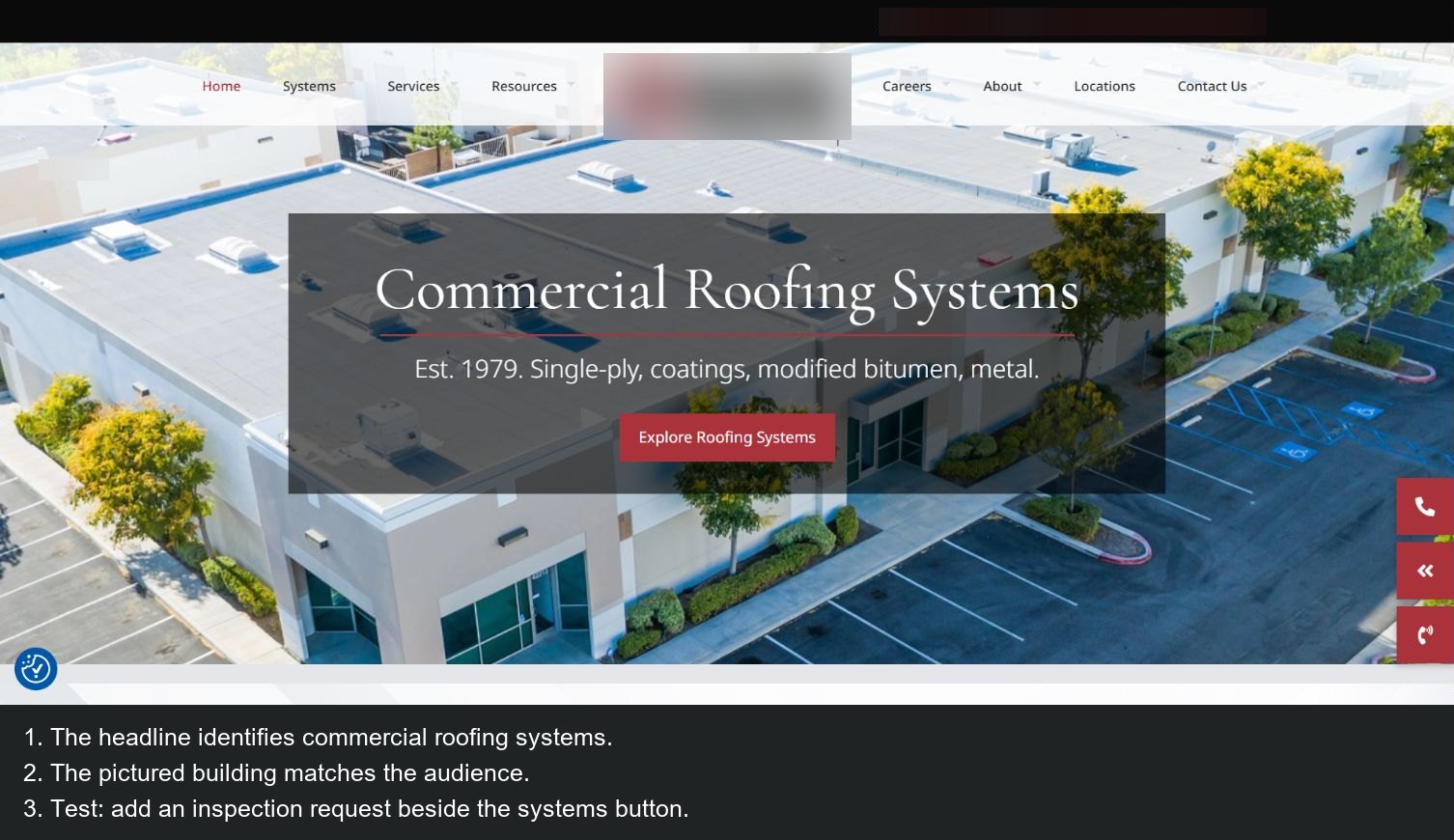
Source: contractor homepage, captured October 28, 2026.
Two useful choices: the captured slide identifies commercial roofing systems, and the building image matches that audience. The supporting line names roof-system types, which gives a facilities buyer a useful route into more detail.
One thing I'd test: I'd test an inspection-request action beside the systems button on this slide. That would give buyers who are ready to talk a direct option while keeping the useful educational route for those exploring systems.
Storm work: match the offer to the form
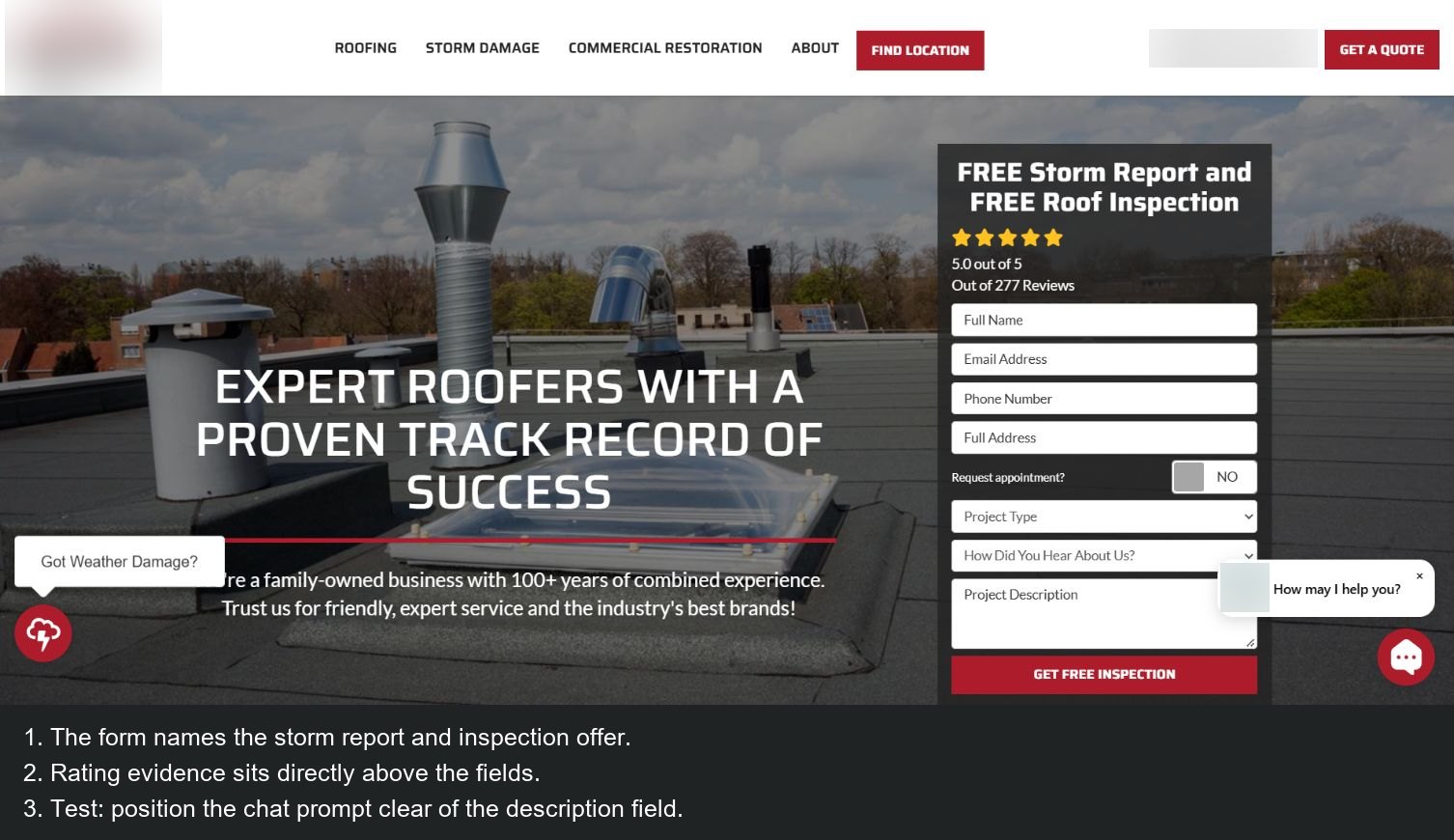
Source: contractor homepage, captured October 28, 2026.
Two useful choices: the form names the storm-report and inspection offer, and rating evidence appears immediately above the fields. The visitor can see what they're requesting while deciding whether to share their details.
One thing I'd test: I'd test positioning the chat prompt clear of the description field, including with the phone keyboard open. That would give visitors more room to explain the work while keeping chat easy to reach.
Service and area pages
Build one useful page for each service you actively sell. A repair page should explain the problems you inspect, what information helps your office and how to book. A replacement page should cover material choices, the inspection, the estimate and the installation process. They shouldn't read like the same page with one word changed.
Put real project photos beside the relevant advice. If you want metal work, show a metal installation and explain the system. If you're selling commercial maintenance, show the type of building and the maintenance work. Don't expect a shingle gallery to answer every buyer's question.
An area page needs a real reason to exist: actual coverage, local work you can describe and useful details for that homeowner. Don't invent a local office or a project to fill a city-name template. Use SEO for roofing companies for the fuller page and local-search plan.
Project case studies that sell
Turn a completed job into a short answer to the next homeowner's concern. You don't need a long success story. You need enough detail to show that your crew understands the problem and has done the work.
| Part | What to collect |
|---|---|
| Before | A clear photo of the original condition |
| Problem | What the owner noticed and why they called |
| Findings | What the inspection found, in ordinary language |
| Work | What you repaired or replaced, including the roof system and materials |
| Time | The actual job timeline, including any relevant interruption |
| After | A finished photo that lets someone understand the change |
| Customer comment | Their real words, only with permission |
| Location | Town or broad area, without a street address |
Example: your job notes might say that water was getting in near a roof penetration, the inspection found a flashing problem and the crew repaired that detail. Use the actual notes and photographs from your job rather than turning every repair into a dramatic full-roof replacement story.
Keep private documents, faces, house numbers and plates out of the published set unless you have the appropriate permission. You can still explain the job clearly without exposing the homeowner's details.
Landing pages for ads
Give each ad a page that continues its promise. Someone clicking a roof-leak repair ad shouldn't land on a homepage about every exterior service you've ever offered. Start with the repair, the area and how to arrange an inspection.
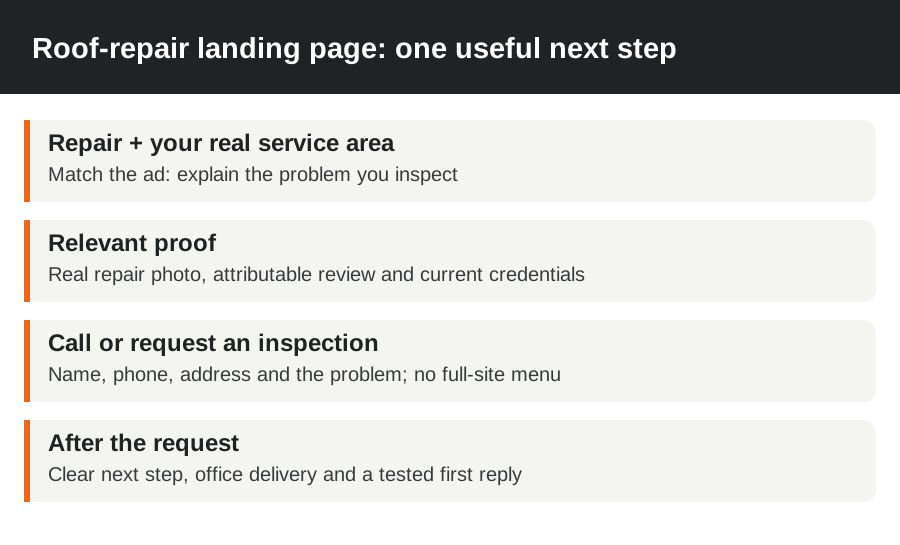
Use one offer, a matching headline, relevant proof, a call button and a short form. Keep the main navigation off this focused page so the request stays easy to find, while retaining business identity, privacy information and essential details. Don't remove information a homeowner needs to decide whether to contact you.
After submission, say what happens next and give a useful phone option if the situation changes. Test the actual delivery to your office and the first reply. A page that displays a thank-you message while losing the inquiry isn't ready for ad traffic.
If people click but don't contact you, inspect the page on a phone, compare its offer with the ad and listen to the calls that do arrive. If inquiries arrive but inspections don't get booked, look at response time, service area and the office handoff before redesigning the page.
Instant quote tools on your site
Use an instant estimate when it helps a homeowner understand the likely project and take the next step. Keep a call or inspection route alongside it. Someone with a leak may need help describing the problem more than a measurement-based replacement price.
Check where the tool sends the inquiry, whether it works on phones and how it explains the assumptions behind its number. Don't let a preliminary estimate look like a final inspection-based contract price.
Templates, AI builders or a designer?
Choose a template if you've got the time to supply the content, check the details and maintain it. An AI builder can produce a first layout quickly, but you've still got to replace invented claims, add real photos and test the booking route. Don't let it invent your years in business, certifications or customer reviews.
Choose a designer or agency when the work includes an existing-site migration, service-page structure, performance fixes or ongoing updates that you won't manage yourself. Ask to see the mobile service pages as well as the homepage. That's where many ad and search visitors will arrive.
| Route | Best fit | Work you still need to own |
|---|---|---|
| Template | A straightforward site with someone available to maintain it | Accurate content, real photos, working contact details and regular checks |
| AI builder | A quick first draft or focused landing-page test | Review every claim, replace generic imagery and test on real devices |
| Designer or agency | A larger change or ongoing website and marketing work | Supply genuine business details, access and feedback on the inquiries |
Before you replace a working website
Keep the domain in an account you control and save a copy of your content and photos. Get a list of the pages that already bring useful inquiries. If a page address changes, map it to the relevant replacement rather than sending every old page to the homepage.
Ask about hosting, updates, tool subscriptions and what you'll receive if you leave. A low build price isn't the full cost if every photo change needs a separate job. Equally, you don't need to replace a site that's doing its job because a new design trend looks attractive.
Before the switch, send a test inquiry on your own site and follow it all the way to the office or calendar. After the switch, do it again. Record who received it, what the homeowner saw and what happened next. That's a more useful acceptance check than whether everyone likes the header color.
Want it run for you? Our roofing website design service includes website work and reviewed job-photo updates in packages from $297/month. Tell us your area and the roofing work you want, and we'll show you what we'd fix first.
FAQ
What should a roofing website include?
Start with your services, area, phone and inspection request, then add real reviews, job photos and a page for each service. Explain the process and test what happens after a form is sent. Those basics matter more than a complicated animation.
Do roofing website templates work?
Yes, a template is a good choice for a straightforward site if you'll replace the generic content and keep it working. Use real photos and specific service details. Test its mobile forms before paying to send traffic to it.
How many pages does a roofing site need?
Start with 8 useful pages for a basic repair-and-replacement business: home, repair, replacement, about, reviews or projects, service area, contact and a thank-you page. Add storm, specialty or commercial pages when you offer that work. The right count follows your services, not a package promising the most pages.
Should I put prices on my website?
Yes, publish useful ranges when you've got actual pricing data and can explain what the range includes. Say what roof size, material or repair it covers and what changes the price. If you can't support a number, explain the estimate process and let the homeowner book an inspection.