
Your website should make a referred homeowner comfortable calling you and give a new visitor a clear way to book an inspection. They'll want to see what you do, where you work and whether you've handled a roof like theirs. They shouldn't have to hunt through a slideshow to find your number.
9xLocal builds roofing websites and keeps them current with your latest jobs. Website work sits inside our agency-replacement packages from $297/month, alongside the marketing and follow-up your business needs.
Tell us about your site. We'll look at your service area, the work you want and what needs fixing first. Prefer to assess it yourself? Use the roofing website examples and checklist.
Why roofers pick 9xLocal
One team from $297/month, no build fee
We bring your website, SEO, ads and follow-up together. There's no separate setup or build fee: your website is included in your package.
Your latest roofs on your site
Your crew uploads job photos through the app. A strategist reviews them before they're added to the website, so the site doesn't stop at launch day.
Follow-up until they book
Our AI assistant follows up with new leads. It can book straight into your calendar or hand the conversation to your office. You choose the route.
Everything we build is yours
You own the work. If you cancel, we hand over the website files. Your ad accounts and Google Business Profile stay yours too.
A month at a time
We're month to month with a 30-day money-back guarantee. Ad spend is separate, paid straight to the platforms with no markup.
What a roofing website has to do
Lead with the roofing service and area, then give the homeowner a call button and an inspection request. Follow that with real evidence. A roof repair visitor wants to know you handle leaks; a commercial buyer wants proof of the systems and buildings you work on.
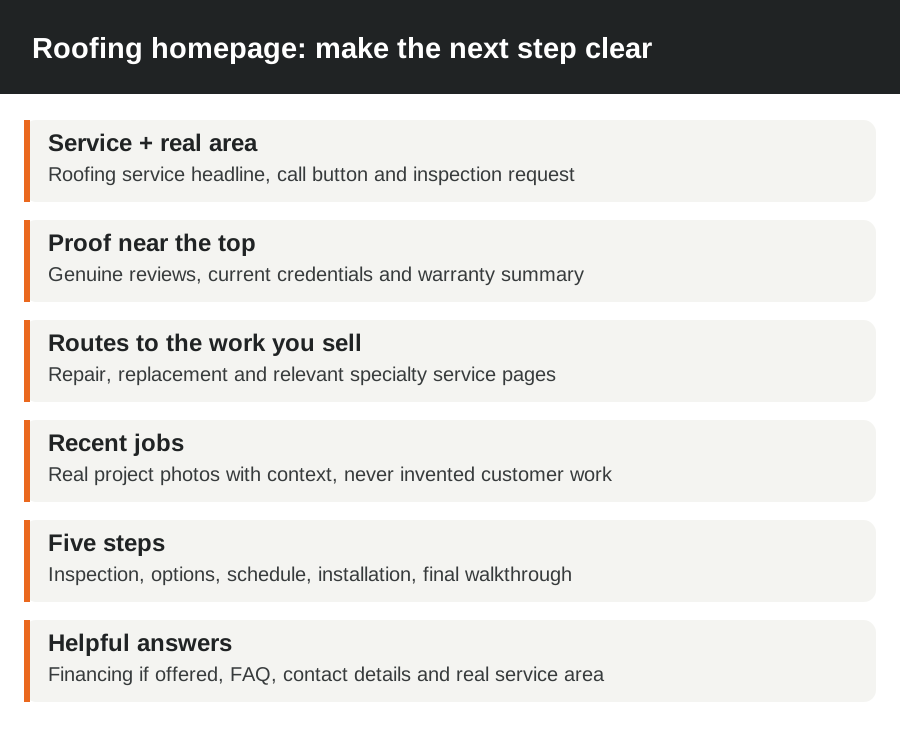
This is the order we'd use for a straightforward roofing homepage:
- Say what you do and where. Keep the phone number and inspection button easy to find.
- Show genuine recent reviews near the top, with a route to their source.
- Add current licensing, insurance, real manufacturer certifications and a clear warranty summary.
- Give replacement, repairs and your other services their own routes.
- Show recent local work with a short description of the problem and what your crew did.
- Explain the process: inspection, options and estimate, scheduling, installation, then final walkthrough and cleanup.
- Explain financing if you offer it, answer common questions and repeat your contact details and service area.
Don't fill the proof row with badges you haven't earned. Real roofing experience is more useful than a wall of decorative logos. We'll organize the evidence you've got and show you what's missing before it goes on the site.
Pages we build
Start with the work you actually sell. You don't need a page for every roofing material if your crew only installs asphalt shingles. A smaller site with specific, useful answers is a better starting point than a large menu of services you can't deliver.
| Page | What it should help the visitor decide |
|---|---|
| Home | Do you do my type of work in my area, and how do I reach you? |
| Roof replacement | What are my options, and what happens at the inspection? |
| Repairs and leaks | Can you inspect this problem, and what information should I send? |
| Storm damage help | How do I arrange an inspection and document what happened? |
| Metal or other specialty roofs | Have you installed this system, and can I see real work? |
| Flat and commercial roofing | Do you work on buildings and roof systems like mine? |
| Gutters or siding, if offered | Can you handle this alongside the roof? |
| Real service areas | Will you travel here, and have you worked nearby? |
| Reviews and about the team | Who will I be dealing with, and what do customers say? |
| Financing | What options can I explore, and where do I apply? |
| Contact and booking | Can I call, text or send the details without a long form? |
| Ad landing page | Does this answer the exact service the ad offered? |
| Thank-you page | Did my request arrive, and what happens next? |
9xLocal connects these pages so homeowners can move from a service question to an inspection. We keep storm content focused on your inspection and roofing work; insurance and deductible wording must follow the rules where you operate.
Keeping it current with your job photos
Send a small set of useful photos from each job through the 9xLocal app: the problem, work in progress and the finished roof. Add the roof type, broad location and a sentence about what changed. You don't need to write a blog post after a day on the roof.
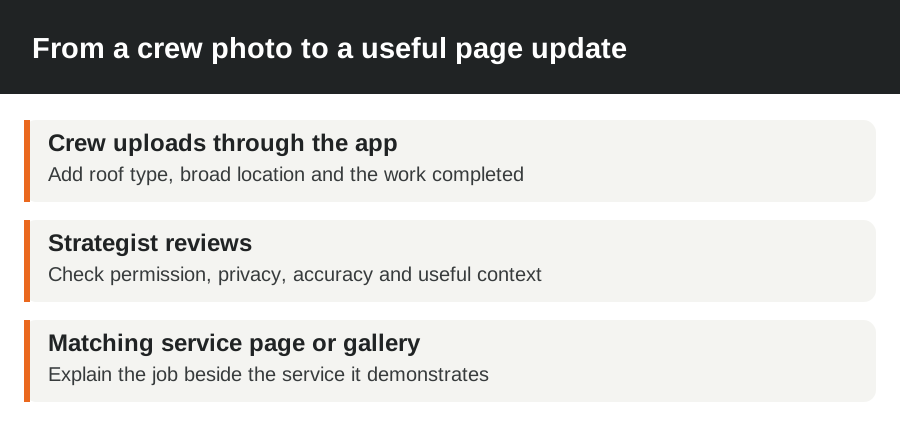
A strategist reviews the submission, selects what helps the homeowner and adds it to the matching service page or gallery. A metal roof belongs beside your metal roofing advice, not buried among unrelated repairs.
Get the owner's permission for identifiable property photos and remove faces, house numbers, plates and personal details before publication. Don't use AI-generated roofs as evidence of your crew's work.
We also look at the words around the photos. A useful caption explains the roof system and the work completed. It doesn't need to repeat a town name five times. If your team changes its service area or stops offering a service, tell us so the site stays accurate.
Built to turn visitors into booked inspections
Make the next step easy on a real phone. We'll build around a tap-to-call route, a short form and a clear response after submission. Start with name, phone, address and what's wrong; ask for extra detail when it's needed to route the work.
Check the booking route with the keyboard open. A chat bubble that covers the submit button can stop someone who's already decided to contact you. Large images, autoplay video and overlapping pop-ups can get in the way too.
Use a genuine review feed where it fits, with access to the original reviews, rather than inventing quotes for a design. A short owner or crew video can explain what happens on an inspection. Let the homeowner choose to play it.
The important test comes after the form says thanks. We send a test inquiry through the actual route and check that the right person receives it, the reply makes sense and the calendar or office handoff works. We'll connect that route to AI text follow-up until the homeowner books. You can choose direct calendar booking or an office handoff.
Measure inquiries and booked inspections separately. If forms arrive but nobody replies, the next fix is the handoff. If calls are coming from outside your area, tighten the page and the traffic source. More visitors won't fix either problem.
One-time build vs monthly plan
Choose a one-time build if you've got someone who'll keep it accurate, working and connected to your marketing. Choose a monthly service if you want a team handling that work with you. Compare the whole first year and what you'll own when you leave.
| Question | One-time build | Monthly plan |
|---|---|---|
| What do I pay? | A build fee, plus any hosting, maintenance and later changes | A recurring fee for a defined scope; compare any separate setup costs |
| Who updates recent work? | Your team or whoever you hire for updates | Ask whether real project updates are included and who supplies the photos |
| Who fixes a broken form? | Someone needs responsibility after handover | Know who receives the fault report and tests the fix |
| Is SEO included? | A completed design doesn't automatically include ongoing SEO | Look for actual page and profile work, not just the word SEO |
| What happens if I leave? | Get the files, access and usable handover | Check the same things, including what needs new hosting |
9xLocal packages start at $297/month. We tailor the scope to your site and goals; ad spend is separate. We handle website upkeep and reviewed photo updates as part of the work, and everything we build belongs to you. We don't make you repurchase your site to get the files when you leave.
Switching from your current site
Keep the useful parts. If a roof repair page already brings qualified inquiries, we wouldn't throw its address away because a new menu looks tidier. We review existing pages, search performance and the booking route before choosing what to replace.
We'll need access to your domain, hosting and the site, plus your Google Business Profile where the wider marketing work needs it. Keep the domain registered under an account you control. Don't cancel old hosting before the replacement is ready.
Our switch checklist covers:
- Save the current site and its important page addresses.
- Keep useful content, customer-approved photos and working URLs.
- Map changed addresses to their nearest relevant new pages with redirects.
- Test calls, forms, thank-you messages and the follow-up route.
- Check mobile pages, internal links and the live site after the switch.
9xLocal usually launches in 3 working days after we receive access. If your switch includes a larger migration or a separate tool, we'll review that work before setting its delivery date. Bring the access details and available photos first; those are often what holds a straightforward project up.
Questions to ask any roofing website company
Before you sign with anyone, get these five things in writing:
- What pages, updates and ongoing work does the price cover?
- Who controls the domain, site files and advertising accounts?
- Where does a form inquiry go, and who tests the reply?
- How will you preserve the useful pages on my existing site?
- What do I receive if I leave, and who will host it then?
How 9xLocal answers
We build the scope around the work and area you want, with packages from $297/month. We handle website work, reviewed crew-photo updates and the lead follow-up route. Your accounts remain yours, and we hand over the website files if you cancel. We'll review your existing pages before the switch and test the route from inquiry to office or calendar.
For the wider work, see our roofing marketing service. If visibility is the main problem, start with roofing SEO services.
Fix this first
Fix a broken phone number, form or reply process before paying to attract more visitors. If your current site already answers the right questions and books inspections, a focused update may be all it needs. We'd rather improve that route than rebuild useful pages for the sake of it.
This service fits owners who can supply accurate service details, access and real job photos, and who've got a way to take the inspections. If you want fabricated project photos, invented reviews or an instant promise of first place on Google, we aren't a fit.
FAQ
How much does a roofing website cost?
A professionally built roofing website from a web design agency usually costs $2,000 to $10,000 up front, and more for a larger custom site, plus roughly $50 to $200 a month for hosting and upkeep. DIY builders and templates cost less (about $14 to $29 a month, or around $800 to $1,600 for a one-off template build), but you write the pages, add the photos, handle SEO and test the inquiries yourself. 9xLocal has no separate setup or build fee: your website is included in your package from $297/month, along with updates from your latest job photos, local SEO and AI follow-up that books inspections.
Do I own my website and domain?
Yes, everything 9xLocal builds is yours, and we hand over your website files if you cancel. Keep the domain in an account you control. You'll need somewhere to host the files after a move; ownership and ongoing hosting are separate things.
Can you redesign my existing site?
Yes. We'll start by keeping the pages and content that are already useful, then fix the layout, mobile booking route and gaps in your service information. You don't need a complete rebuild just because the homepage looks dated.
Will it rank on Google?
It's built to rank: clear service pages, fast mobile pages and accurate business details are the foundation Google looks for. Build the site and do the SEO work together; continued local SEO addresses the competition and the searches you want. Search positions depend on that ongoing work and your market. See SEO for roofing companies for the work involved.
Can you add an instant quote tool?
Yes, we can link to a tool you choose. We'll review an embedded integration separately so the page still works on phones and the inquiry reaches your team. Use an inspection to settle details a measurement-based estimate can't answer.
How long does a new site take?
Your first website version can be live within 3 working days of getting access. We keep improving it from there with your job photos and new service pages. Larger migrations or custom add-ons can take longer. Have your service area, contact details and basic business information ready.
Let's make your site easier to book from
Show us your site and service area. Tell us which roofing work you want more of, and we'll show you what we'd fix first and how we'd connect the site to follow-up.