
Measure calls, booked inspections and paid jobs from search. You're trying to fill the schedule with work you want, so a ranking report should help explain those results.
Prefer us to do it? See our roofing SEO services. For the wider plan, start with our roofing marketing agency or the roofing marketing guide.
Where roofing customers find you on Google
Your Google profile and website earn separate places in search. Paid ads can appear above or beside them. Here's how to tell the results apart before you judge where you're showing up.
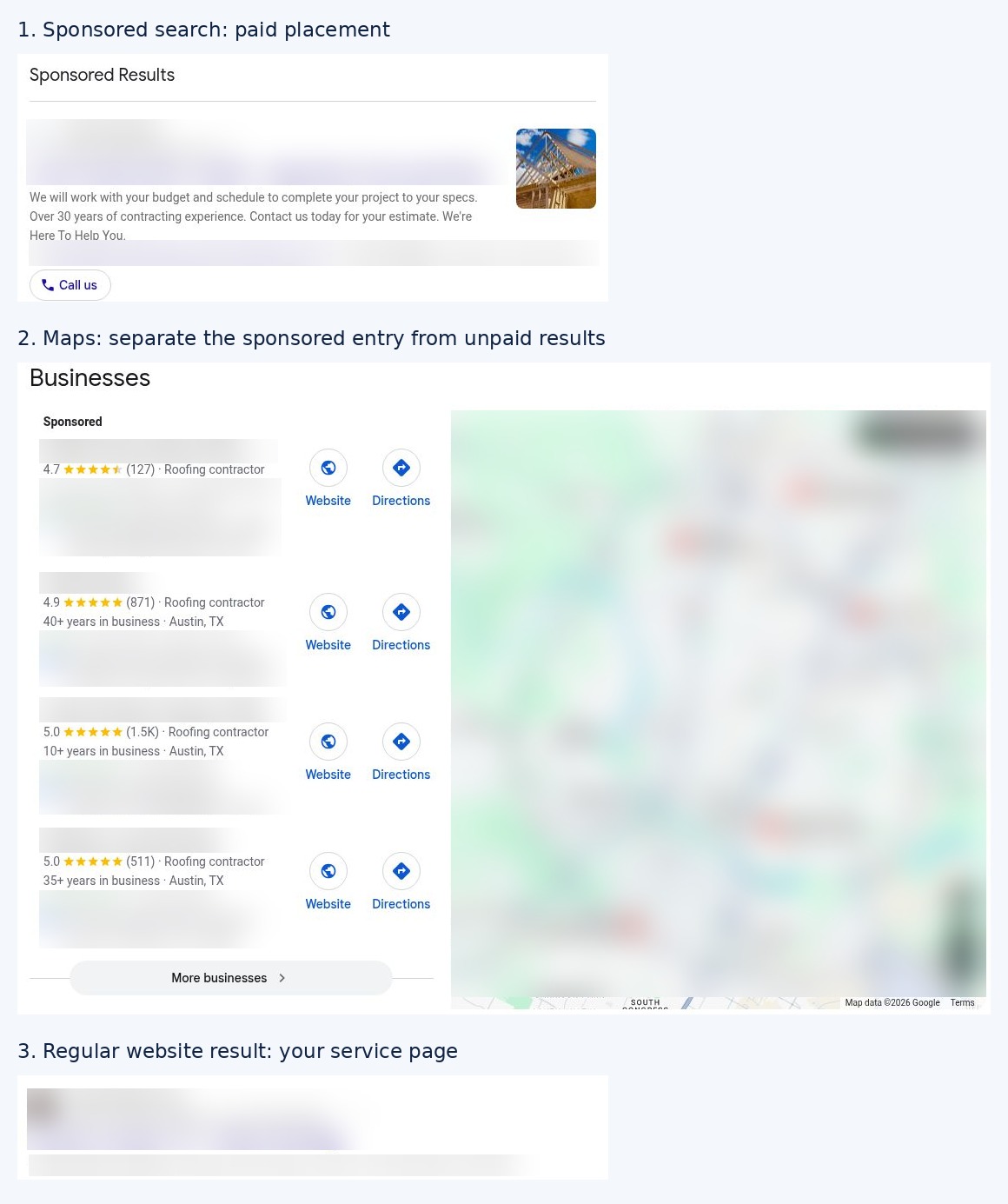
| Place in search | How you appear there | What the homeowner sees |
|---|---|---|
| Local Services Ads | Join the program, pass its checks and pay for leads | A paid local provider listing, with the Google Verified badge for verified providers |
| Sponsored search ads | Run a Google Ads campaign | An ad linked to your website |
| Unpaid map results | Maintain your Google Business Profile | Your area, reviews, services and contact options |
| Regular website results | Make useful service pages Google can read | A page answering the search, such as roof repair in your town |
| AI answers, when shown | Publish clear, accessible answers with real business and job details | An answer that may include supporting website links |
SEO works on the last three. Don't count a sponsored map entry as an unpaid ranking. And don't judge your whole area from one search at your desk: distance from the searcher changes local results.
The 15-minute Google profile check
Open your profile as a customer would, then print this table or copy it into your office checklist. Mark each row Pass or Fix and put a person's name beside each fix. If you haven't claimed and verified the profile, do that first and keep the owner account in your business.
| Check | Pass when... | Pass / Fix | Who'll fix it? |
|---|---|---|---|
| Business name | It matches your signs, trucks and website, without added search phrases | ___ | ___ |
| Category | Roofing contractor describes your main business; extra categories describe work you really do | ___ | ___ |
| Service area | The towns are places you'll actually travel to; your address is hidden if customers don't visit | ___ | ___ |
| Phone | A test call reaches the person or answering service responsible for inquiries | ___ | ___ |
| Hours | They match when customers can reach you, including holiday changes | ___ | ___ |
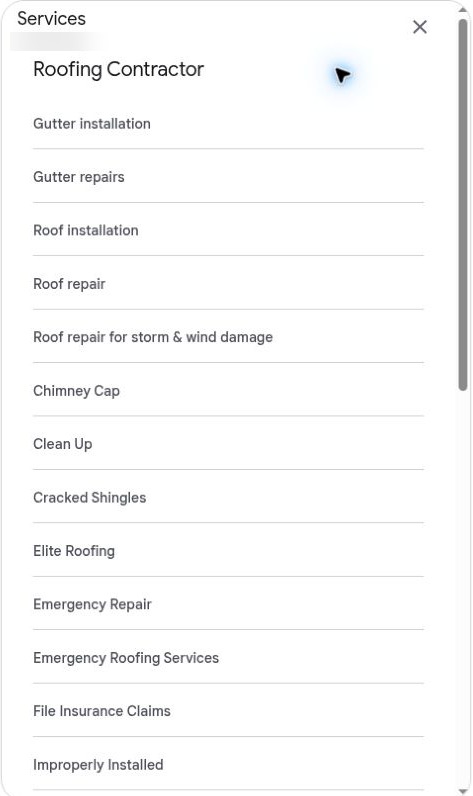
| Services | Replacement, repair, storm inspections and any metal, commercial or gutter work are listed clearly | ___ | ___ |
| Photos | Customers can see your own recent roofs, crew and trucks | ___ | ___ |
| Reviews | You're asking customers consistently and replying without sharing their private details | ___ | ___ |
| Website | The link opens a useful page with a working call button and inspection form | ___ | ___ |
| Posts | Any offer or update is still accurate; old availability claims are removed | ___ | ___ |
Fix the first three failures before adding more content. A wrong phone number costs you an inquiry today. An extra post won't repair that.
Set aside time each week to add useful job photos and answer reviews. Posts are optional: use them when you've got something helpful to say, such as changed hours or an available inspection day.
Reviews without breaking the rules
Ask every customer for an honest review when the work's finished. Make the request part of closing the job, so it doesn't rely on someone remembering later. Use the same invitation for a happy customer and a difficult job.
Here's a text you can adapt:
Hi [name], thanks for choosing us for your roof. Would you share your experience in a Google review? It'll help other homeowners understand our work: [review link]. Thanks, [your name].
Only text people you're allowed to contact, and honor opt-outs. Don't offer money, gifts or discounts for reviews, recruit staff or family, filter out unhappy customers, or give staff review quotas.
An inspection can be a real experience too. If you've told a homeowner their roof is sound, they can describe that visit honestly. Don't ask them to write as though you've replaced the roof.
Reply to each review. Thank the customer for taking the time. If something went wrong, offer a direct way to resolve it and keep the job's private details out of the reply. You're showing the next homeowner how you handle people as well as roofs.
Build one page per roofing service
Start with the services you want more of. Give each a page that answers the buyer's questions and shows work you've done. You don't need a separate page for every variation of the same phrase.
| Page | Who searches it | What to show |
|---|---|---|
| Roof replacement | A homeowner planning a new roof | Materials, tear-off and installation process, warranty terms, genuine financing options and completed roofs |
| Roof repair and leak repair | Someone who needs a problem fixed | Leaks you handle, when you can visit, repair photos and a clear call button |
| Storm damage help | A homeowner worried about hail or wind | What you inspect, the photo report they'll receive and the next step after inspection |
| Metal roofing | A buyer comparing longer-term options | Systems you install, cost factors, noise and maintenance questions, and real projects |
| Flat and commercial roofing | A building owner or property manager | TPO, EPDM or coatings you actually work on, access requirements and maintenance options |
| Gutters, if offered | A homeowner with drainage problems | Repair versus replacement, materials and how the work fits with roofing |
On storm pages, explain the inspection and repair scope without promising insurance approval, a free roof or payment of the homeowner's deductible.
Match each search to one useful page
Write down the words people use on calls. Then look at the queries in Google Search Console and assign each group to a page. "Roof leaking around chimney" and "roof leak repair [town]" can lead to the same repair page if it explains that work well.
Example: use "Roof Repair in [Town] | [Business Name]" as a title, then show the leaks you fix, a real repair and how to book. Link to that page from your service menu and related job stories. Don't stuff the town name into every paragraph.
If you repair TPO seams or coat commercial roofs, those specific services deserve attention. Look at the local results before deciding whether they need their own pages. A narrower search can bring the right buyer even when it doesn't bring many visitors.
Only build a city page when you've got something to show
Use a city page for a town where you work and can add local projects, relevant photos, customer questions and practical coverage details. If all you've changed is the town name, improve the main service page first.
Use your job photos
Give the crew a simple habit: photograph the problem and finished work, then leave a short note. You need the roof type, what was wrong, what you did and the town. That's enough for the office to turn a photo into a useful explanation.
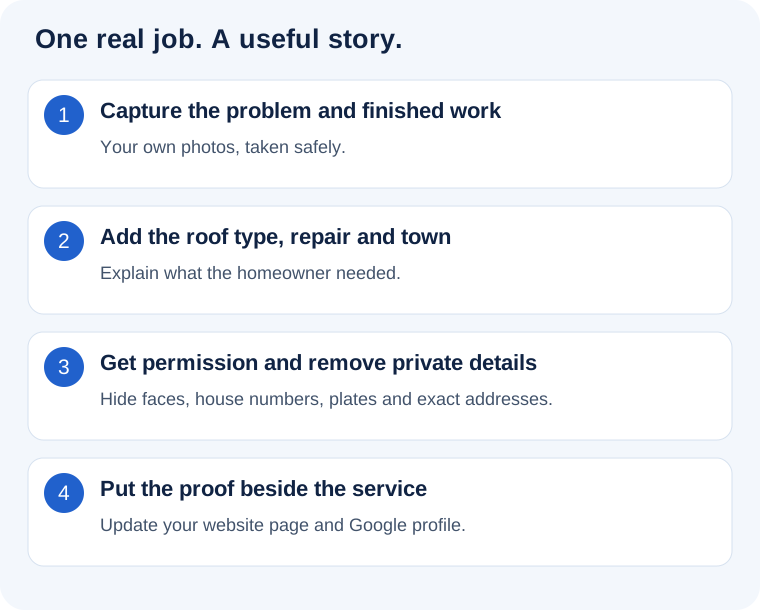
Get permission before sharing customer photos, and remove house numbers, faces, license plates and exact addresses. Do that before the files leave your private job record.
Example: "Replaced damaged step flashing beside a chimney on an asphalt roof in Round Rock. We tested the repaired area before closing the job." Pair that note with the actual photos on your repair page and Google profile.
Don't turn every photo into another thin blog post. Add it where it helps a buyer judge the relevant service. If the photo's dark or the repair isn't visible, ask the crew for a clearer shot on the next suitable job.
Links and listings that matter
Start by fixing important wrong information. Check Google, Apple Maps, Bing, Yelp, BBB and Facebook, plus Angi or Nextdoor if you use them. An old phone number or moved office needs attention before you buy another directory package.
Then work through relationships you've already earned:
- A manufacturer contractor listing, if you're eligible for its program.
- A supplier who features your real work.
- Your chamber of commerce or trade association.
- A local team, charity or community project you genuinely support.
- Local news about work that's worth reporting.
Ask for a useful business listing or accurate credit for your work. Don't buy links or guest-post bundles to manipulate rankings. If you're paying for a sponsorship, choose it for the audience and relationship it reaches.
What holds roofing SEO back
Fix the broken path before commissioning more articles. These are the checks I'd run first.
| Problem | Your next move |
|---|---|
| Other roofers have a similar name | Use your full real business name consistently; make your town, phone and identity clear |
| People visit but don't call | Put the right service, area, proof and next step near the top; test the page on your phone |
| Pages repeat each other | Combine thin overlapping content and keep the strongest useful page |
| The page is slow on a phone | Compress oversized photos and remove unnecessary scripts or video backgrounds |
| Google isn't finding the service page | Inspect its URL in Search Console and fix access or indexing problems |
Give your web person a specific indexing check
Ask them to inspect your main service URLs in Search Console. The page should load successfully, allow indexing and identify the intended page as its canonical, which tells Google the preferred URL. It should also have a normal link from another useful page on your site.
If Search Console says the page is excluded, read the reason before requesting indexing. A page that's deliberately hidden or redirected needs fixing first. You don't need a new website to correct one bad setting.
Test the inquiry from start to finish
On your phone, tap the call button and submit a test inspection request. Tell the office it's a test. Check who receives it, whether the message includes the service and location, and whether the homeowner gets a clear next step.
If the form only sends an email to an old employee, fix the recipient today. If calls go unanswered while the crew's on a roof, assign someone to respond. More search traffic won't solve either problem.
Showing up in AI answers
Make the same service pages useful for a person and readable by a search engine. Say what you do, where you work and which customers you serve. Answer real questions directly, then show the detail and job evidence behind the answer.
You don't need special AI schema or an AI text file for Google's AI search features. Your page needs to be indexed and eligible to appear with a search snippet. Keep your business information accurate and your important answers in text, rather than only inside a video or image.
For example, answer "Can this roof be repaired?" with the conditions that make repair sensible, the signs you'll inspect and when replacement becomes the better choice. Don't publish a hundred near-identical AI articles and expect them to replace roofing knowledge.
How long SEO takes and what to measure
Map changes usually show in 4 to 8 weeks. Website SEO usually takes 3 to 6 months to show useful movement, with a new site or a competitive metro often taking longer. Fixing an incorrect profile is a different job from winning a busy city's replacement searches.
Track the work completed alongside the business results. You'll want to know which service pages went live, which photos were added and which problems were fixed, then whether suitable inquiries increased.
| Measure | Where to look | What it tells you |
|---|---|---|
| Search queries and website clicks | Search Console | Whether the right services are getting found |
| Profile call-button taps | Business Profile performance | People tried the call route; check answered calls separately |
| Answered calls and forms | Call records and your inquiry log | How many real people reached you |
| Booked and attended inspections | Your calendar or CRM | Whether inquiries became visits |
| Signed roofs and completed paid jobs | Sales and job records | Which search inquiries became collected work |
Keep one row per inquiry: date, source, job type, town, booked visit, attended visit, signed job and payment. You'll spot the difference between a campaign attracting the wrong work and an office missing good calls.
Example: if search inquiries rise but booked visits stay flat, listen to missed calls and review the form responses before asking for more traffic. If bookings rise but sales don't, inspect job fit, estimates and follow-up.
Do it yourself or hire help
Allow about 1 to 2 hours a week for photos, review requests, replies and a quick look at inquiries. DIY works when someone owns that routine and your website is already sound. Hire help when the technical fixes or content work keep getting pushed behind jobs.
Before hiring, ask what they'll fix first, which service pages they'll improve and how they'll connect search inquiries to inspections. Keep access to your domain, profile, website and reporting accounts. You'll need those to judge the work and change providers if you choose.
Want it run for you? Our roofing SEO services cover your profile, service pages, photo updates and local search in packages from $297/month. Your crew sends job photos through the 9xLocal app; a strategist reviews them before they're added to your website. Tell us your area and the roofing work you want.
FAQ
How long does roofing SEO take?
Usually 4 to 8 weeks for early Maps changes and 3 to 6 months for useful website progress. Your starting site, local competition and how quickly the fixes get done change the pace. Look at suitable calls and booked visits alongside rankings.
How much should I pay for SEO?
I'd start by comparing focused local proposals around $1,000 to $2,000/month. A site rebuild, several locations or heavy content work can cost more. Ask exactly what gets done each month so you can compare the scope.
Do I need a page for every city?
No. Build strong service pages first, then add a city page where you've got real local work and useful details to show. A list of towns doesn't require a matching pile of pages.
Do reviews help ranking?
Yes. Google says review numbers and positive ratings can help local ranking. Keep asking for honest feedback and improving the experience that earns it; there's no magic count you need to hit.
Can I rank without an office address?
Yes. A service-area roofer can use a Google Business Profile without displaying a customer-facing office. Use your real operating details, hide the address when customers don't visit and skip fake offices or rented mailboxes.
Is SEO better than Google Ads for roofers?
Choose SEO to build your ongoing local presence; choose Google Ads when you need to test demand sooner and have money and inspection slots available. Keep the profile and website working either way. Paid clicks still need a good page and someone who'll answer.