
Houzz can be a place to show your remodeling work, software for running projects or a way to buy advertising. Decide which problem you're trying to solve first. If estimates and selections are eating your evenings, test the software on one job. If you need more inquiries, price the advertising separately and ask how those inquiries reach your office.
Your own website matters alongside a directory profile. Our remodeling website design service can give homeowners a place to see your projects, understand your process and request a consultation.
3 different things you can buy
Make three separate decisions, even when they're presented in one sales call. A better project system can save time without bringing you a single new lead. An attractive profile can help someone check your work without proving that paid ads are profitable.
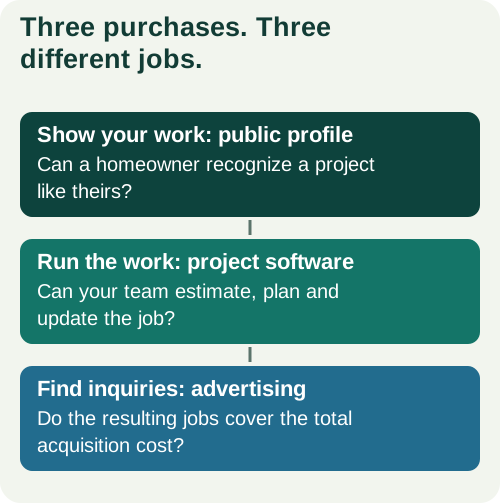
| Part of Houzz | The job you want it to do | How I'd judge it |
|---|---|---|
| Public profile | Show your services, area, projects and customer feedback. | Can a homeowner find a similar job and understand what you do? |
| Project software | Help the team estimate, plan and manage work. | Can the people using it complete the tasks that slow them down? |
| Advertising | Put the business in front of potential customers. | Do the inquiries become jobs at a cost your margins can carry? |
A general contractor selling whole-home remodels has different needs from a small bathroom crew. The first may need design coordination and several people working in the system. The second may mainly need quicker estimates and a clean way to communicate changes. Buy for the work you do each week.
What Houzz costs now
Houzz's US contractor pricing page lists Pro at $199/month, Teams from $399/month and advertising packages from $499/month. Pro plus the advertised starting ad package adds up to $698/month before extras or taxes. These are displayed prices checked October 30, 2026, not a quote for your company.
| Purchase | Displayed starting price | Budget question |
|---|---|---|
| Pro software | $199/month | Does the included work fit your team? |
| Teams software | From $399/month | Which users and features are in your quote? |
| Advertising add-on | From $499/month | What's the area, service and full commitment? |
The pricing FAQ says an annual subscription begins after the free trial unless you cancel during it. Twelve months at the displayed Pro rate is $2,388. Check the term, renewal and cancellation deadline before starting.
There's also a user-count mismatch between two official pages: the pricing grid shows five Teams users, while the pricing explainer says unlimited. Ask which applies to your order. That's worth resolving before you plan the team around it.
3 remodeler profiles to learn from
Look at how these contractors organize their work. These are public profile screenshots, captured October 30, 2026. They show presentation choices, not evidence that Houzz brought the companies leads or that they're 9xLocal clients.
1. Put the town beside the project
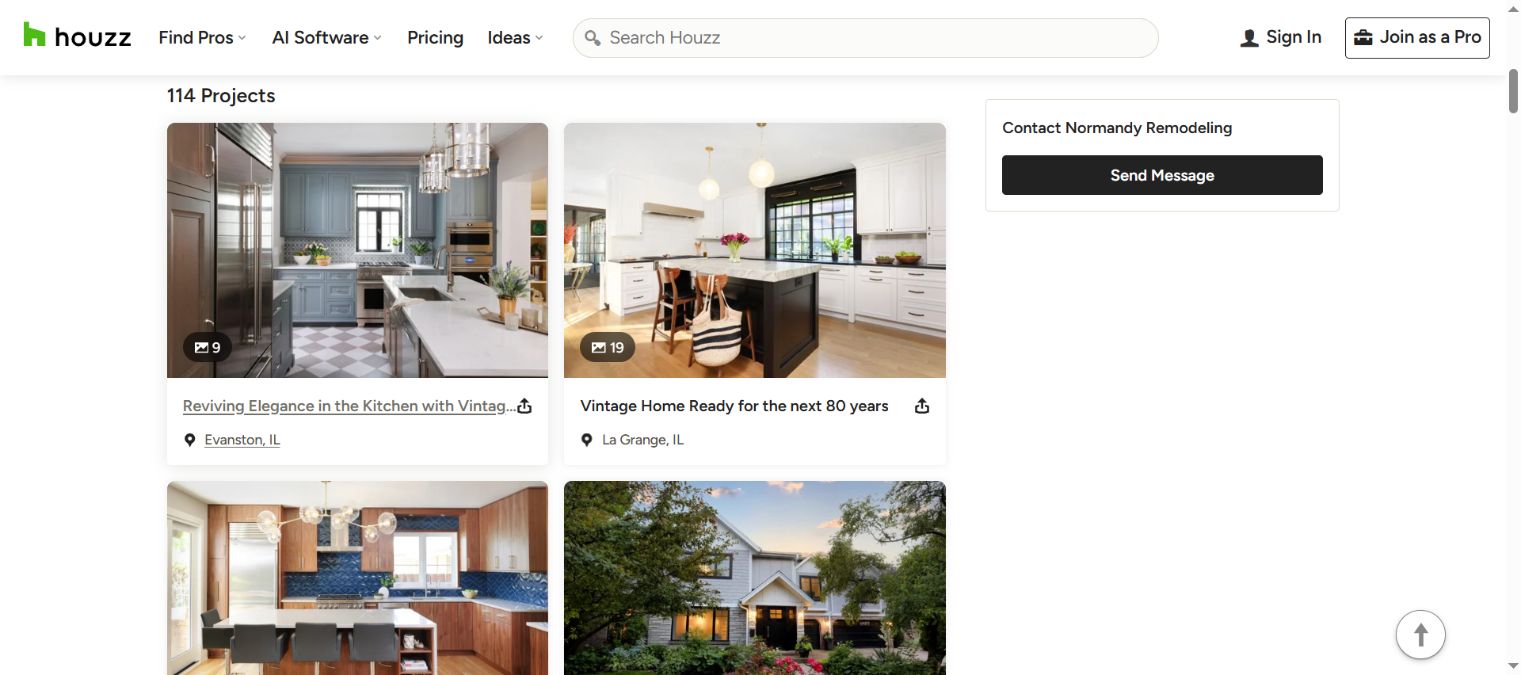
Normandy Remodeling's gallery puts the project title and town beneath each photo. A homeowner can browse the rooms and see where the company has worked.
- What's good: the kitchen pictures lead, with locations close to the titles.
- What to copy: name each project by the job and town, using photos from that job.
- What I'd change: shorten long creative titles so the job type stays readable on a phone.
2. Help visitors choose a room
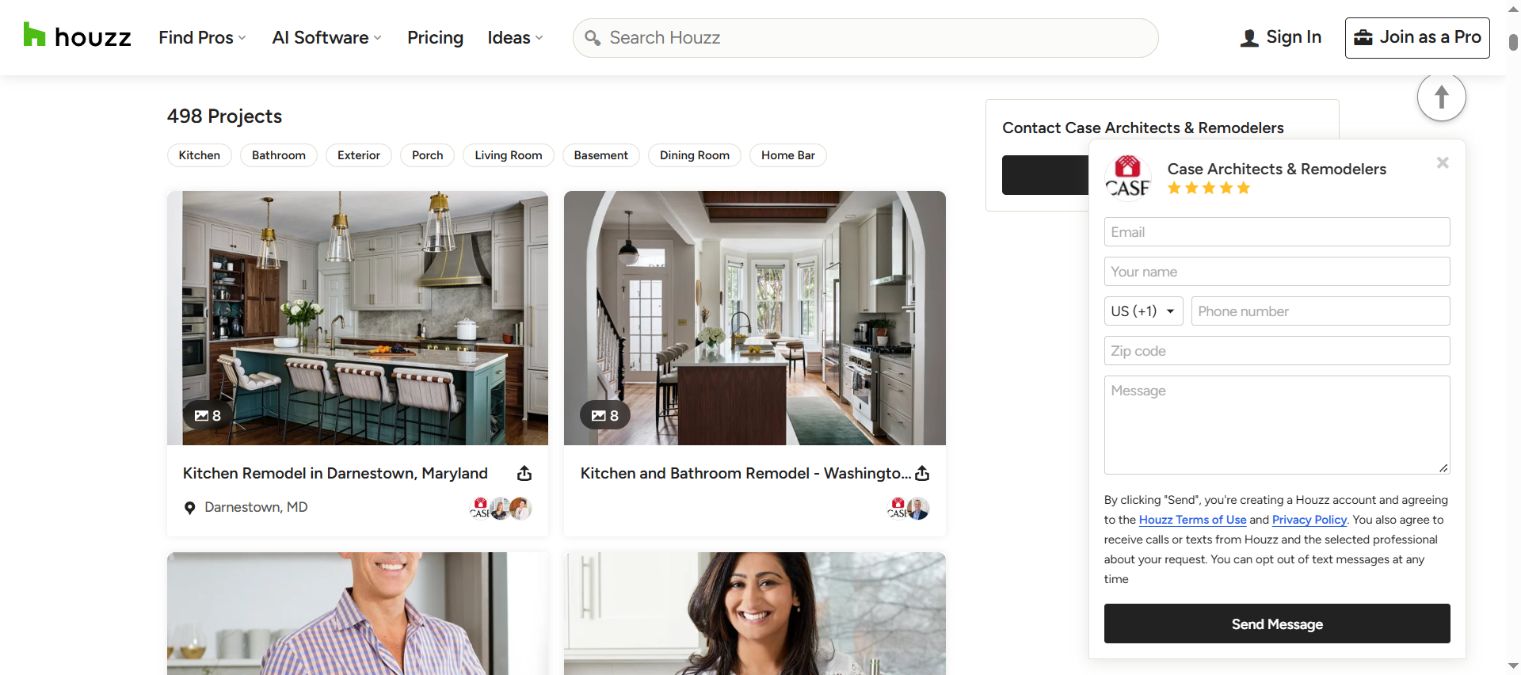
Case Architects & Remodelers gives visitors room filters above the gallery. Its albums include kitchen projects and introductions to the team.
- What's good: someone shopping for a bathroom can choose that room instead of scrolling through every project.
- What to copy: group additions, kitchens, bathrooms and basements where the platform allows it.
- What I'd change: separate team albums from the main project browsing path so homeowners find similar work faster.
3. Distinguish a kitchen from a whole-home job
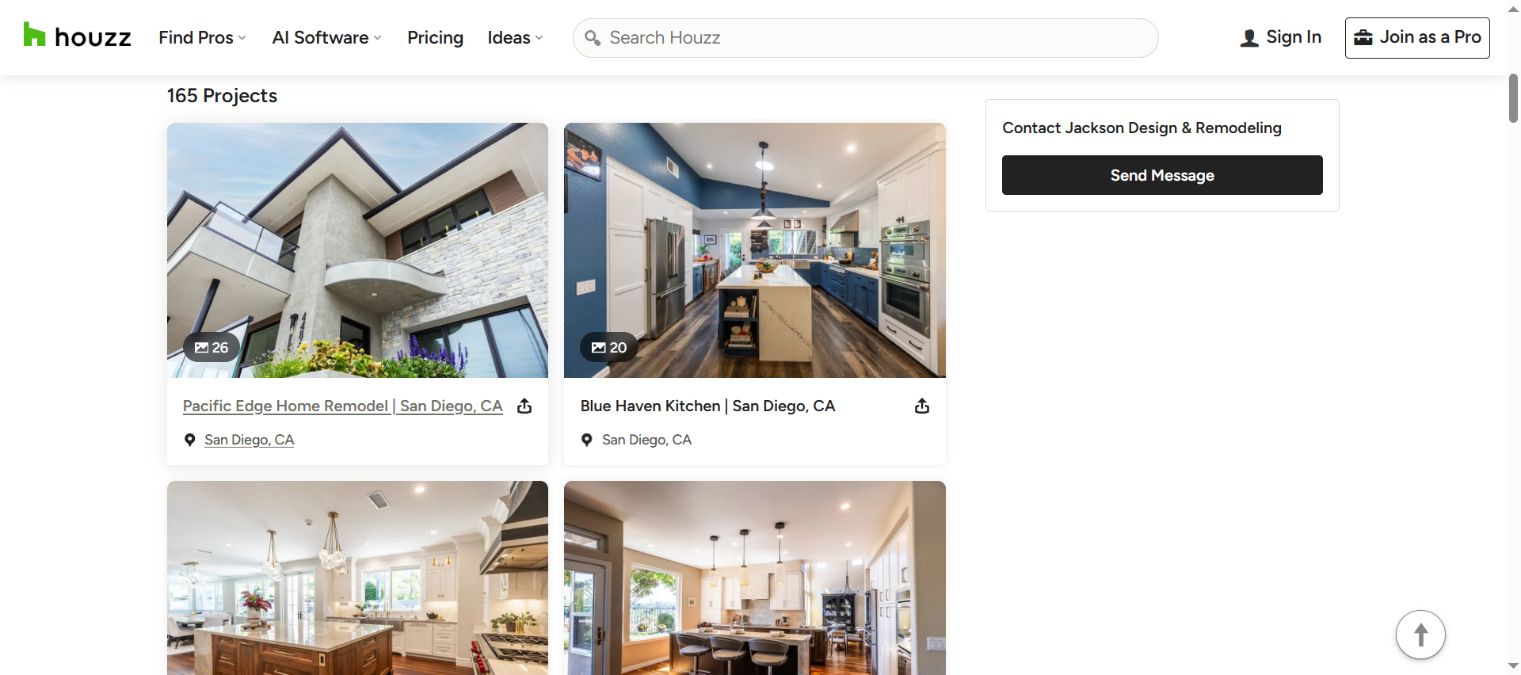
Jackson Design & Remodeling labels projects as home remodels or kitchens, with San Diego in the visible titles. That gives the photos context.
- What's good: the titles tell you the scale of the work, beyond the room in the picture.
- What to copy: make a whole-home or multi-room project easy to distinguish from a single-room remodel.
- What I'd change: add a short opening description explaining the homeowner's problem and the main change.
The lesson is simple: a portfolio should help someone recognize their own project. Twenty photos of cabinets say less than a short explanation of why the layout changed, what your team handled and how the new space works.
Test the software on one job
Use one familiar job for the demo or trial. An addition with drawings and selections can show you different problems from a straightforward bathroom. Choose the kind you price most often.
Houzz's contractor getting-started guide shows project setup and tools for estimates, invoices, scheduling and design work. That's the documented workflow. We haven't run a hands-on trial of the paid software for this guide.
Ask the person who'll use it to walk through these tasks:
- Create the job with the homeowner's details and the right team access.
- Build an estimate from your own scope and costs.
- Change one selection and see what needs updating.
- Send the client the document or view they'd receive.
- Record a change and show how the office and field team find it.
- Create the invoice or payment request your process needs.
- Export the records you'd want if you stopped using the system.
Time the tasks that cause trouble today. If your estimator keeps a separate spreadsheet because the new estimate is hard to revise, you haven't removed that work. If the office can find the latest selection without calling the owner, you've found something worth pricing.
Include the bookkeeper in questions about payments and accounting. Include the project manager in questions about field updates. A polished sales demo can't tell you whether those people will use the system on a busy Tuesday.
Price the time saved and jobs won
Run two calculations. One values the time the software saves. The other checks the cost of winning work through advertising. Keeping them separate makes the decision much clearer.
For a software example, suppose a package costs $300/month and saves five hours. You're paying $60 per hour saved, before setup and training. Those are teaching assumptions, not a Houzz package price. Put in your quote, onboarding time and the value you place on the hours you'd get back.
Five hours saved are worth more when you can use them for pricing jobs or getting home earlier. They may be worth less if the new system adds work for someone else. Ask the team where the time goes, rather than taking the demo's time-saving claim as your own result.
For advertising, imagine $1,200 in total acquisition costs producing one finished, paid job. That's $1,200 per job. With two jobs from the same spend, it's $600. With none, you've spent the money and have no finished-job return yet. The tool keeps that zero visible.
Include the time your office spends contacting people, booking calls and preparing visits. If a subscription bundles software and ads, show the total cash commitment too. You can separate costs for management decisions while still knowing what leaves the bank.
Build a profile that answers questions
Start with the jobs you want more of and the towns you serve. “Residential remodeling” is broad. Say whether you handle additions, kitchens, bathrooms, basements, whole-home work or several of those services.
For each project, explain four things:
- What the homeowner wanted to change.
- What your company handled, including design or trade coordination where relevant.
- The biggest scope decision.
- The finished result, shown in your own photos.
For an addition, the important story might be connecting new living space to an existing kitchen. For a basement, it might be turning an unused room into family space with a bathroom. A kitchen photo becomes more persuasive when the reader understands the original layout problem.
Use photos you're allowed to publish and keep private household details out. Ask for an honest review through the platform's current process. Then give someone in the office responsibility for incoming messages. A strong gallery and an unanswered inquiry are a poor combination.
Keep business details consistent with your website. The profile can introduce you; the site can explain your estimating process, team and services in more depth. Homeowners should recognize the same business in both places.
Compare it with your other options
Choose the next purchase around the gap in your business. More software won't fill an empty appointment calendar by itself. More advertising won't solve missing estimates or a team that can't find the latest plans.
| Your main problem | What I'd look at first |
|---|---|
| Quotes and selections are scattered | A one-job software test with the estimator and office. |
| People check you out but struggle to see similar work | Better project photos, profile organization and your own website. |
| You need people already searching for your service | Search advertising and the page those searches reach. |
| You have strong project photos and can follow up | A focused Facebook or Instagram offer. |
| You want more local visibility over time | Your Google profile, reviews and service pages. |
Read our Google Ads guide for remodelers for the cost and intent comparison. The Facebook ads guide shows real offers and the kind of conversations they can start. For the longer-term local work, see SEO for remodelers.
You can use more than one channel. Give each a job, a budget and a person responsible. Then judge the advertising after enough of the leads have had time to become jobs. A new addition inquiry and a finished bathroom invoice won't mature on the same schedule.
7 questions before paying
Get seven answers before committing money or moving your records. This is the place for the buying checks, so you can make the rest of the decision around the work.
- Which product am I buying? Separate profile features, software and advertising.
- Who can use it? Name the people and access they need.
- What's the full cost and term? Include onboarding, add-ons, payment fees where applicable and the advertising commitment.
- When does it renew, and how do I cancel? Save the dates where your office will see them.
- What area and job types does the advertising cover? Ask how inquiries are delivered and handled.
- What's included in the work? Distinguish a feature you can use from a service someone performs for you.
- What can I take with me? Check the exports for contacts, estimates, photos and project records.
Keep your current records available while you test the new process. Move the team when the people doing the work can complete that one-job checklist. You'll have a much stronger reason to buy than liking the demo.
Frequently asked questions
Does Houzz Pro include remodeling leads?
Treat software and advertising as separate purchases. The current pricing page lists an advertising add-on. Ask what your package includes, how inquiries arrive and what you pay for each part.
Is Houzz worth it for a small general contractor?
Start with one problem you can name. Software may earn its place by making estimates or project communication easier. Advertising needs a separate job-cost test. A small business can start with a clear profile and improve its project presentation before buying a larger package.
Is the free trial month to month afterward?
Read the current trial terms before starting. The pricing FAQ says the annual subscription begins after the free trial unless you cancel during it. Put the deadline on the calendar and ask about anything your quote leaves unclear.
Can a profile bring in more work?
A clear profile helps a homeowner find a job like theirs and decide whether to call. It can't tell you how many inquiries you'll receive or whether those people will hire you. Use the project examples here to improve the presentation, then review the inquiries your own business receives.
Your next step
Choose the job for this purchase: save time, show your work or find inquiries. Get the quote for that need and run the matching calculation. If the main gap is your own site, see website design for remodeling contractors. Website work is included in the selected 9xLocal package from $297/month, with no separate build fee.
Sources
- Houzz: Houzz Pro Pricing. Verified October 30, 2026.