
Our remodeling website design service covers the managed buying decision. Use the examples and checks below to work out what your site needs first.
Use the three-task buyer test
Give someone unfamiliar with your site a homeowner's task. Ask them to find a project like the one they're considering, establish whether you work in their town and start a consultation request. Let them try without coaching.
Write down where they get stuck. “Couldn't find an addition project” is a repair you can make. “Looks a little old” needs more explanation before it earns a rebuild budget.
| Task | A clear pass | A reason to fix the site |
|---|---|---|
| Find comparable work. | A visitor can reach the right service and project. | All projects sit in one unlabeled gallery. |
| Check coverage. | The service area is clear before the form. | The town is hidden or old locations conflict. |
| Request a conversation. | The visitor knows what to send and who replies. | The form fails or nobody knows where it goes. |
Try the same tasks on a phone. A large photograph can look excellent on a desktop and push the only contact action several screens down on a small device. Check the reading and contact journey at normal phone size.
Keep the results with your design brief. You're buying answers to specific homeowner problems, and those checks give you a way to review the first version.
What a remodeling website costs
For a broad market comparison, Clutch lists web design agency projects from $2,000 to $100,000 in its 2026 guide, with scope and complexity affecting the price. That broad range isn't a remodeling website quote. Ask for the pages, content, photos, migration and ongoing support needed by your business.
Compare three choices: repair the existing site, buy a new one-off build or choose an ongoing managed package. The cheapest first invoice can become expensive if the site can't be updated or the office has to rebuild the forms later.
Use the cost comparison tool with matching scope. Example: a $900 repair plus $60/month upkeep costs $1,620 over a year. A $4,800 build plus $80/month upkeep costs $5,760. A hypothetical $380 monthly service costs $4,560 over that year. Those are teaching inputs, not market averages or 9xLocal quotes.
I'd choose the repair when it fixes the buyer tasks and leaves a maintainable site. Consider a rebuild when the structure or platform prevents the needed changes. Compare an ongoing service when you want website work and continuing marketing support in the same plan.
With 9xLocal, there's no separate setup or website build fee in the selected package, starting from $297/month. The quote defines the work. Compare its scope with a one-off project rather than treating the monthly starting price as an unlimited custom-build promise.
Make the opening screen earn its space
Tell the visitor what you build, where you work and what they can do next. Use a relevant photo of your own work, then give it a sentence of context. A slogan alone can leave someone guessing whether you handle additions, cosmetic updates or new homes.
Here's an original first-screen pattern:
Homepage opening for a renovation company
Multi-room renovations in {your real service area}
Make the rooms you already have work better together. We handle {your design/build role}, from {first step} through {your construction scope}. See a comparable project, then tell us about your house and plans.
Button: Discuss your renovation
Adapt the promise to what your business does. If you're taking planning conversations for a later build, say that near the next step. Keep availability consistent with the office.
Use readable text over photos and keep a clear contact action. The image should show relevant work without making the phone number or button difficult to find. Let the homeowner understand the offer before inviting them into a long portfolio.
3 remodeling websites to learn from
These public contractor sites were inspected for this guide on October 30, 2026. They're fresh examples for this remodeling collection. Study the organization and use your own photographs, wording and capabilities. We haven't measured their sales results or submitted their forms.
CRD: help people choose a project
CRD connects its services with named project examples, including whole-house work, additions and basements. A visitor can recognize the type of work before opening a project.
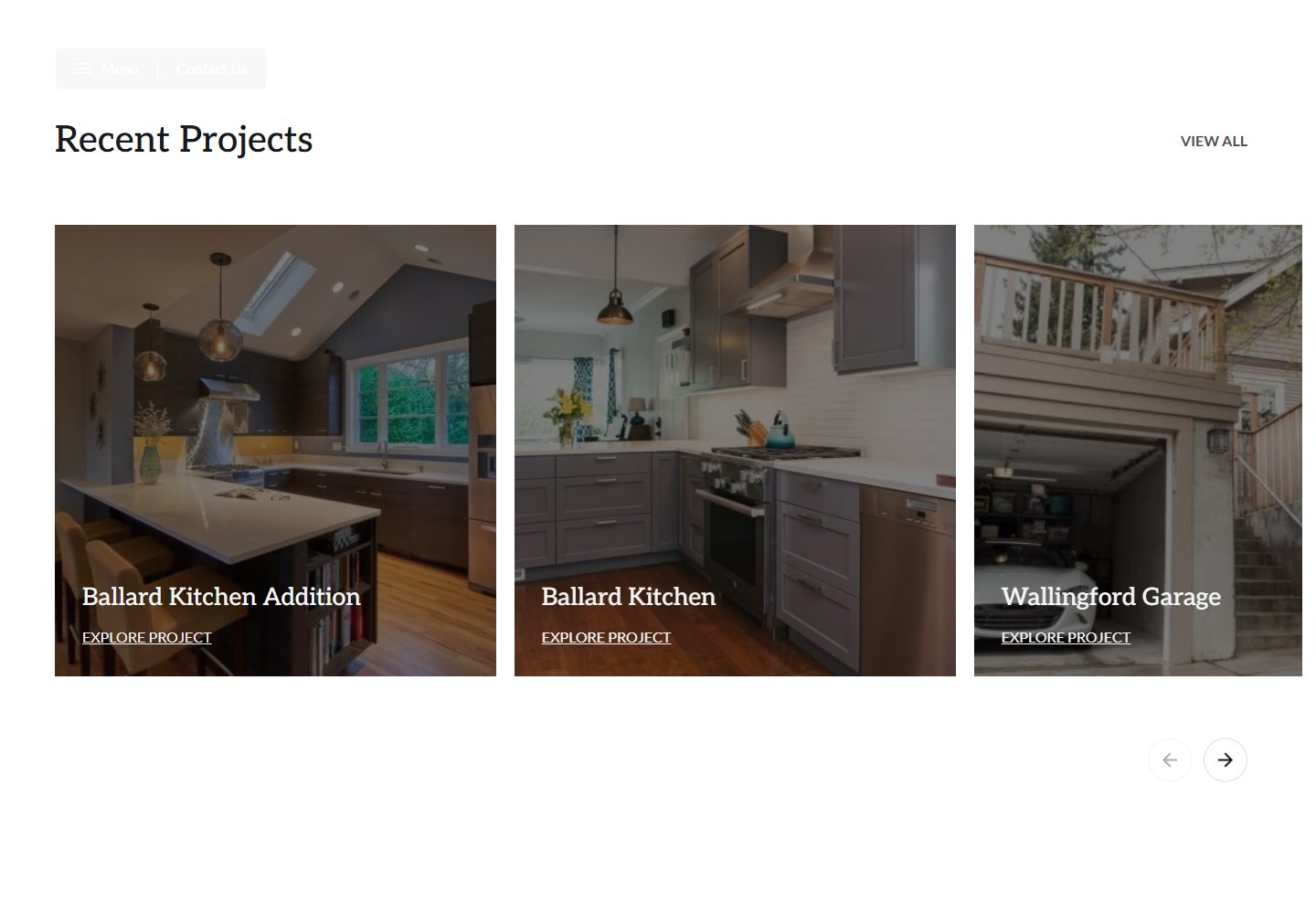
Website example: CRD. Captured October 30, 2026.
What's good: the project labels do some of the sorting for the homeowner. A named whole-house remodel is easier to choose than an unlabeled interior photo.
What to copy: group the work around the services you want to sell. A small company can use a few clear project links rather than a complicated filtering system.
What I'd change for a smaller firm: bring the specific service and area into the main opening, then keep the path to a consultation close to the examples. Your visitor should understand the work before having to open a menu.
COCOON: make the process visible
COCOON separates its process into planning, design and building. That helps show why an early conversation and a construction start are different stages.
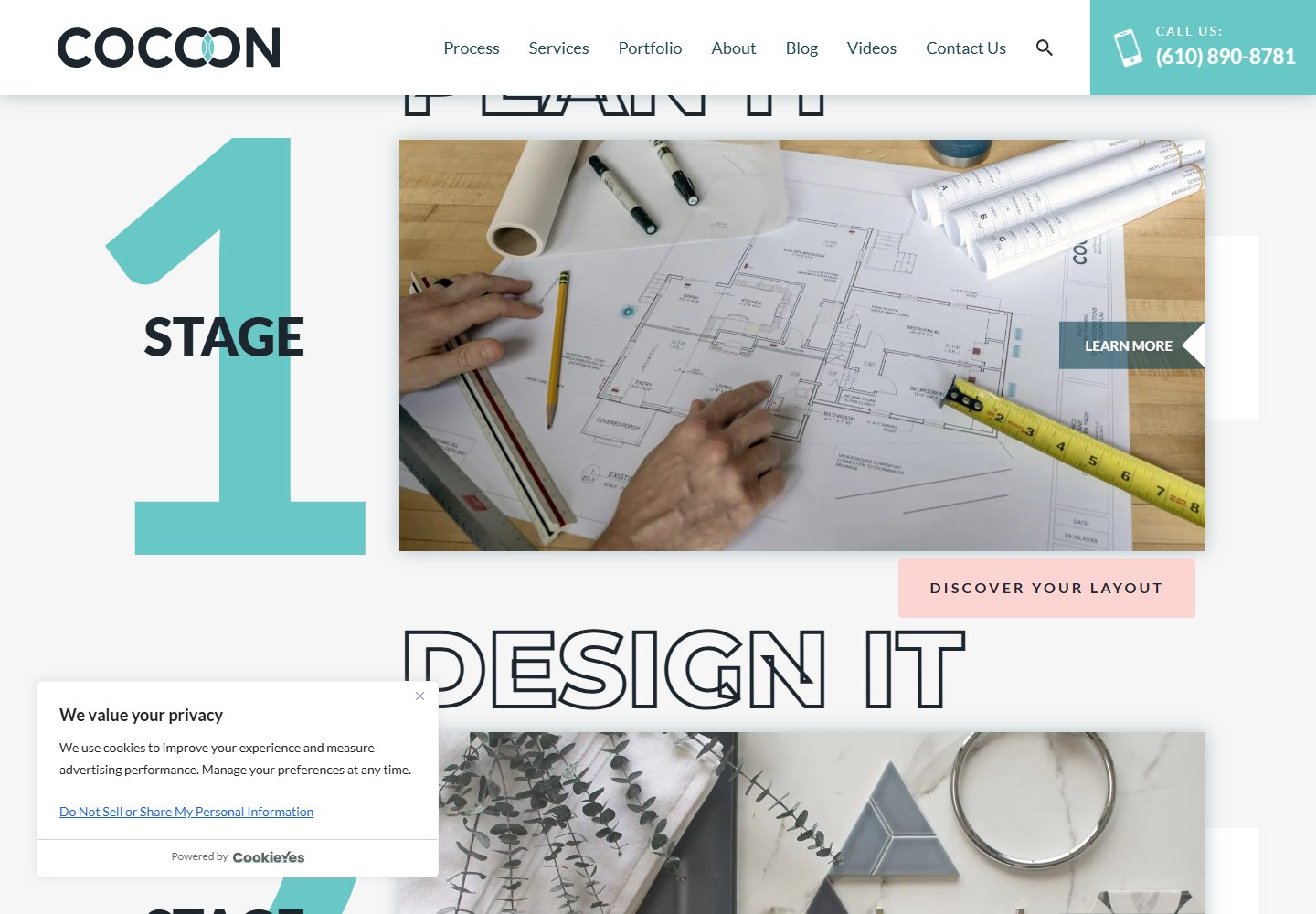
Website example: COCOON. Captured October 30, 2026.
What's good: the process has names a homeowner can follow. It gives the visitor more than a finished-room image.
What to copy: explain your own sequence and the decision made at each stage. If you sell paid planning, say what the homeowner receives before they commit.
What I'd change for a smaller firm: make the first conversation and its cost or terms easy to find before describing every later stage. Keep the process short enough to read on a phone.
Factor: give additions their own explanation
Factor's Denver and Boulder additions page separates several addition types and links to more detail. It gives a homeowner starting with “we need more room” more specific choices.
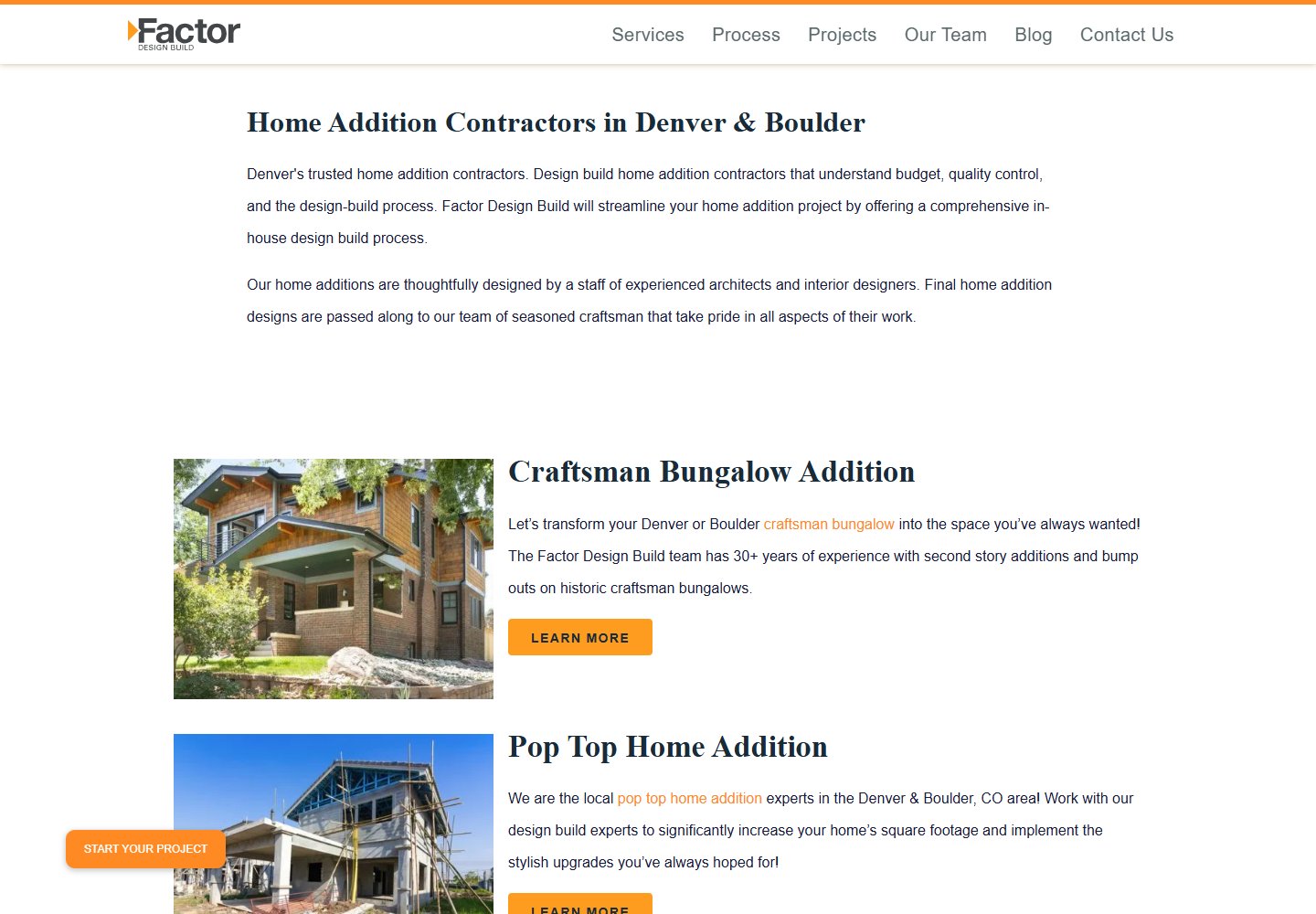
Website example: Factor. Captured October 30, 2026.
What's good: the page is about additions rather than a generic list of every service. The job and area appear in the explanation.
What to copy: give your main service enough room to answer the buyer's practical questions and show the kinds of houses you work on.
What I'd change for a smaller firm: put the job, coverage and first action together above a very large gallery. A homeowner shouldn't have to scroll past a full image presentation to learn whether the work fits.
Explain the portfolio
Use the portfolio to explain a decision. A photograph shows the finish; your description should show what changed, the constraints and your role. That distinction matters when another professional handled design or part of the construction.
Compare these original page patterns:
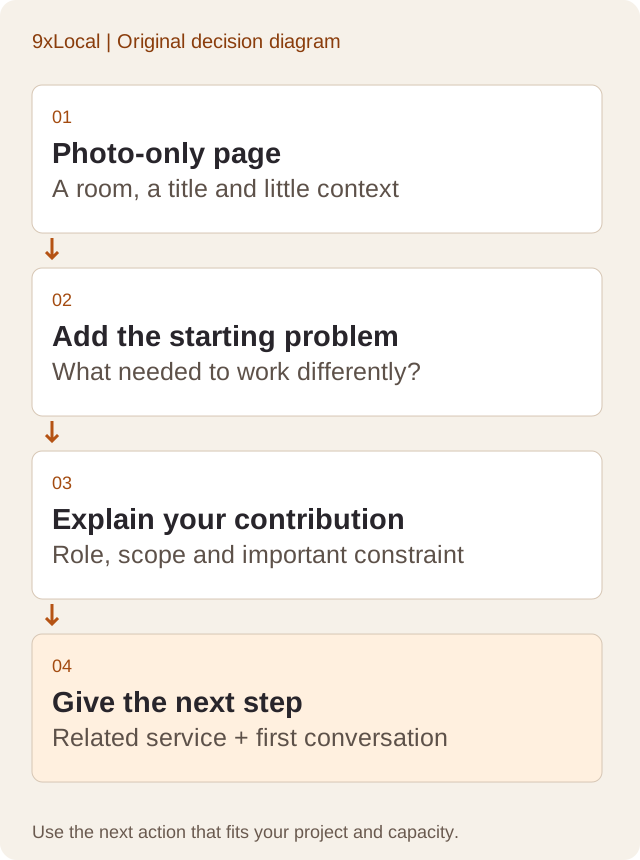
The photo-only version gives a visitor a room and a vague title. The explained version adds the starting problem, scope, responsibility and a related next step. Neither needs a long essay.
For an older-house attic project, your notes might include the homeowner's need for another room, access constraints, who assessed the structure and what your team built. Fill those details from a real project. Leave out a claim you can't support, even if it would make a stronger caption.
Start with three strong projects covering the work you want. That's an editorial starting recommendation, not a required website quota. One well-explained project per main service is more useful than a large library where every image could belong to someone else.
Get permission before sharing photos or identifying a private home. Town-level context is often enough for the reader; a street address rarely helps the buying decision.
Build service pages and a short form
Create a clear page for each main service that needs its own explanation. Combine short, closely related subjects where that helps the reader. An addition page needs different questions from a full bathroom remodel or basement finish.
Include scope, coverage, your design/build role, comparable work and the process before an estimate. Explain cost drivers or honest ranges from your own jobs when you're ready to support them. A finished-room photo shouldn't imply that every house can buy the same work for one price.
Keep the consultation form short enough to finish on a phone. I'd ask for project type, town, timing, contact details and an optional budget discussion. Give early planners a “not sure yet” choice so a good homeowner isn't forced into a made-up answer.
Consultation form introduction
Tell us about the spaces you'd like to change and the town where the house is. Rough ideas are welcome. Our {office role} will reply during {your real contact hours} to discuss the work, timing and the right next step. Sending this form requests a conversation; your appointment is arranged with the team.Explain what happens after submission. Use the remodeling sales process to connect the first call with a visit, estimate or planning service. The form should prepare that conversation, rather than promise an automatic construction price.
Ask about ownership and upkeep
Before buying, ask who controls the domain, website files, content, photographs and accounts. Ask how form records and analytics access are handled and what happens if you leave. Keep a copy of the answer with the project scope.
Choose an update process the business can keep using. Someone needs to add projects, change availability and repair old information. A site that only shows the work you did several years ago makes the next sale harder than it needs to be.
Your contractor supplies accurate project details and photo permissions. In the 9xLocal workflow, your crew can share photos through the app and a strategist reviews website updates before they go live. It's an ongoing managed process, rather than an instruction to publish every phone photo instantly.
If you're replacing an existing site, list the important page addresses and destinations. Preserve working URLs or plan appropriate redirects, then test contact delivery after the switch. The remodeling SEO guide explains how those service and project pages support search discovery.
Repair before rebuilding
I'd prioritize a failed form, hidden coverage or missing service explanation before a visual redesign. Those failures have a direct consequence for a homeowner trying to hire you.
Use fifteen checks to review the first version. Group them around the same three buyer tasks:
- Find the work: clear service, matching photo, comparable project, your role and the main constraint explained.
- Decide whether it fits: real area, project scope, process, timing and supported cost information.
- Start a conversation: visible contact action, short form, readable phone layout, office receipt and a named update owner.
Use the checklist on your own site. Submit one clearly labeled internal test request, record who receives it and check the reply path. Test required fields, error messages and the thank-you state too. Keep test data out of the sales figures.
A successful browser message doesn't prove the office received the request. Find the email or record at the destination. Check a reply can reach the test sender. That closes the gap between a form looking finished and a form doing its job.
For phone testing, tap the number on a phone and check the business destination through your normal internal process. Check links and text at ordinary zoom, then open the menu and close it again. Repair a covered button or sideways-scrolling form before launch.
Frequently asked questions
What matters more than a fancy design?
Relevant proof and a working contact path. A homeowner needs to understand the service, coverage and next step before decorative effects add much value.
How many projects should I show first?
Start with three strong, explained projects. Choose them to cover the work you want next. Add more when they answer a new buyer question.
Should the website show prices?
Yes, when you can support the range and explain the scope. Otherwise show the cost drivers and estimating process. Use your own job history, with clear inclusions and conditions.
Do I need a complete rebuild?
Repair first when the current site can pass the buyer tasks and stay maintainable. Rebuild when the platform or structure prevents the pages, contact journey or upkeep you need.
Your next step
Try the three tasks on your site and save the first failure. Bring that finding, one strong project and your main services into the website brief.
Want the site managed with your marketing? Our remodeling website design service sits inside your 9xLocal plan. We're your agency replacement for more booked jobs, with packages starting from $297/month, no separate setup or build fee and ad spend separate. See if we're a fit.
Sources
- Clutch: Web Design Company Pricing Guide 2026. Verified October 30, 2026. Broad project price range; not a remodeler-specific quote.